Locations
Locations module
Module Identifier: locations
The Location objects live in the CPO back-end system. They describe the charging locations of that operator.
Module dependency: the eMSP endpoint is dependent on the Tariffs module
1. Flow and Lifecycle
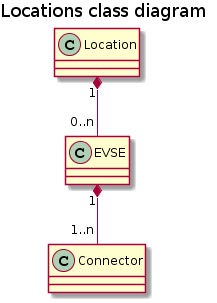
The Locations module has Locations as base object, Locations have EVSEs, EVSEs have Connectors. With the methods in the eMSP interface, Location information/statuses can be shared with the eMSP. Updates can be done to the Location, but also to only an EVSE or a Connector.
When a CPO creates Location objects it pushes them to the eMSPs by calling PUT on the eMSPs Locations endpoint. Providers who do not support push mode need to call GET on the CPOs Locations endpoint to receive the new object.
If the CPO wants to replace a Location related object, they push it to the eMSP systems by calling PUT on their Locations endpoint.
Any changes to a Location related object can also be pushed to the eMSP by calling the PATCH on the eMSPs Locations endpoint. Providers who do not support push mode need to call GET on the CPOs Locations endpoint to receive the updates.
When the CPO wants to delete an EVSE they must update by setting the status field to REMOVED and call the PUT or PATCH on the eMSP system. A Location without valid EVSE objects can be considered as expired and should no longer be displayed. There is no direct way to delete a location.
When the CPO is not sure about the state or existence of a Location, EVSE or Connector object in the eMSPs system, the CPO can call the GET to validate the object in the eMSP system.
2. Interfaces and endpoints
There is both a CPO and an eMSP interface for Locations. Advised is to use the push direction from CPO to eMSP during normal operation. The CPO interface is meant to be used when the connection between 2 parties is established, to retrieve the current list of Location objects with the current status, and when the eMSP is not 100% sure the Locations cache is completely correct. The eMSP can use the CPO GET Object interface to retrieve a specific Location, EVSE or Connector, this might be used by a eMSP that wants information about a specific Location, but has not implemented the eMSP Locations interface (cannot receive push).
2.1 CPO Interface
Example endpoint structure: /ocpi/cpo/2.0/locations
Method |
Description |
Fetch a list locations, last updated between the |
|
POST |
n/a |
PUT |
n/a |
PATCH |
n/a |
DELETE |
n/a |
2.1.1 GET Method
Depending on the URL Segments provided, the GET request can either be used to retrieve information about a list of available locations and EVSEs at this CPO: GET List Or it can be used to get information about a specific Location, EVSE or Connector: GET Object
<!-- Add some whitelines for PDF generation fix, TODO check in new PDf versions -→
<!-- Add some whitelines for PDF generation fix, TODO check in new PDf versions -→
GET List Request Parameters
Example endpoint structures for retrieving a list of Locations:
/ocpi/cpo/2.0/locations/?date_from=xxx&date_to=yyy
/ocpi/cpo/2.0/locations/?offset=50
/ocpi/cpo/2.0/locations/?limit=100
/ocpi/cpo/2.0/locations/?offset=50&limit=100
If additional parameters: last_updated) between the given date_from and date_to will be returned.
If an EVSE is updated, also the 'parent' Location’s last_updated fields is updated. If a Connector is updated, the EVSE’s last_updated and the Location’s last_updated field are updated.
This request is paginated, it supports the pagination related URL parameters.
Parameter |
Datatype |
Required |
Description |
date_from |
no |
Only return Locations that have |
|
date_to |
no |
Only return Locations that have |
|
offset |
int |
no |
The offset of the first object returned. Default is 0. |
limit |
int |
no |
Maximum number of objects to GET. |
GET List Response Data
The endpoint returns a list of Location objects The header will contain the pagination related headers.
Any older information that is not specified in the response is considered no longer valid. Each object must contain all required fields. Fields that are not specified may be considered as null values.
Type |
Card. |
Description |
* |
List of all locations with valid EVSEs. |
GET Object Request Parameters
Example endpoint structures for a specific Location, EVSE or Connector:
/ocpi/cpo/2.0/locations/
/ocpi/cpo/2.0/locations/
/ocpi/cpo/2.0/locations/
The following parameters can be provided as URL segments.
Parameter |
Datatype |
Required |
Description |
location_id |
string(39) |
yes |
Location.id of the Location object to retrieve. |
evse_uid |
string(39) |
no |
Evse.uid, required when requesting an EVSE or Connector object. |
connector_id |
string(36) |
no |
Connector.id, required when requesting a Connector object. |
GET Object Response Data
The response contains the requested object.
| Type                                | Card. | Description                                                |
| *Choice: one of three*              |       |                                                            |
| > [Location](#31-location-object)   | 1     | If a Location object was requested: the Location object.   |
| > [EVSE](#32-evse-object)           | 1     | If an EVSE object was requested: the EVSE object.          |
| > [Connector](#33-connector-object) | 1     | If a Connector object was requested: the Connector object. |
<!-- Add some whitelines for PDF generation fix, TODO check in new PDf versions -→
<!-- Add some whitelines for PDF generation fix, TODO check in new PDf versions -→
2.2 eMSP Interface
Locations is a client owned object, so the end-points need to contain the required extra fields: /ocpi/emsp/2.0/locations/
/ocpi/emsp/2.0/locations/
/ocpi/emsp/2.0/locations/
Method |
Description |
Retrieve a Location as it is stored in the eMSP system. |
|
POST |
n/a (use PUT) |
Push new/updated Location, EVSE and/or Connectors to the eMSP |
|
Notify the eMSP of partial updates to a Location, EVSEs or Connector (such as the status). |
|
DELETE |
n/a (use PATCH) |
2.2.1 GET Method
If the CPO wants to check the status of a Location, EVSE or Connector object in the eMSP system, it might GET the object from the eMSP system for validation purposes. The CPO is the owner of the objects, so it would be illogical if the eMSP system had a different status or was missing an object. If a discrepancy is found, the CPO might push an update to the eMSP via a PUT or PATCH call.
Request Parameters
The following parameters can be provided as URL segments.
Parameter |
Datatype |
Required |
Description |
country_code |
string(2) |
yes |
Country code of the CPO requesting this PUT to the eMSP system. |
party_id |
string(3) |
yes |
Party ID (Provider ID) of the CPO requesting this PUT to the eMSP system. |
location_id |
string(39) |
yes |
Location.id of the Location object to retrieve. |
evse_uid |
string(39) |
no |
Evse.uid, required when requesting an EVSE or Connector object. |
connector_id |
string(36) |
no |
Connector.id, required when requesting a Connector object. |
Response Data
The response contains the requested object.
| Type                                | Card. | Description                                                |
| *Choice: one of three*              |       |                                                            |
| > [Location](#31-location-object)   | 1     | If a Location object was requested: the Location object.   |
| > [EVSE](#32-evse-object)           | 1     | If an EVSE object was requested: the EVSE object.          |
| > [Connector](#33-connector-object) | 1     | If a Connector object was requested: the Connector object. |
<!-- Add some whitelines for PDF generation fix, TODO check in new PDf versions -→
<!-- Add some whitelines for PDF generation fix, TODO check in new PDf versions -→
2.2.2 PUT Method
The CPO pushes available Location/EVSE or Connector objects to the eMSP. PUT is used to send new Location objects to the eMSP, or to replace existing Locations.
Request Parameters
This is an information push message, the objects pushed will not be owned by the eMSP. To make distinctions between objects being pushed to an eMSP from different CPOs, the
Parameter |
Datatype |
Required |
Description |
country_code |
string(2) |
yes |
Country code of the CPO requesting this PUT to the eMSP system. |
party_id |
string(3) |
yes |
Party ID (Provider ID) of the CPO requesting this PUT to the eMSP system. |
location_id |
string(39) |
yes |
Location.id of the new Location object, or the Location of which an EVSE or Location object is send |
evse_uid |
string(39) |
no |
Evse.uid, required when an EVSE or Connector object is send/replaced. |
connector_id |
string(36) |
no |
Connector.id, required when a Connector object is send/replaced. |
Request Body
The request contains the new/updated object.
| Type                                | Card. | Description                                            |
| *Choice: one of three*              |       |                                                        |
| > [Location](#31-location-object)   | 1     | New Location object, or Location object to replace.    |
| > [EVSE](#32-evse-object)           | 1     | New EVSE object, or EVSE object to replace.            |
| > [Connector](#33-connector-object) | 1     | New Connector object, or Connector object to replace.  |
2.2.3 PATCH Method
Same as the PUT method, but only the fields/objects that have to be updated have to be present, other fields/objects that are not specified are considered unchanged.
Example: a simple status update
This is the most common type of update message to notify eMSPs that an EVSE (EVSE with uid 3255 of Charge Point 1012) is now occupied.
PATCH To URL: https://www.server.com/ocpi/emsp/2.0/locations/NL/TNM/1012/3255

{
	"status": "CHARGING"
}
Example: change the location name
In this example the name of location 1012 is updated.
PATCH To URL: https://www.server.com/ocpi/emsp/2.0/locations/NL/TNM/1012

{
	"name": "Interparking Gent Zuid"
}
Example: set tariff update
In this example connector 2 of EVSE 1 of Charge Point 1012, receives a new pricing scheme.
PATCH To URL: https://www.server.com/ocpi/emsp/2.0/locations/NL/TNM/1012/3255/2

{
    "tariff_id": "15"
}
Example: add an EVSE
To add an EVSE, simply put the full object in an update message, including all its required fields. Since the id is new, the receiving party will know that it is a new object. When not all required fields are specified, the object may be discarded.
PUT To URL: https://www.server.com/ocpi/emsp/2.0/locations/NL/TNM/1012/3256

{
	"uid": "3256",
	"evse_id": "BE-BEC-E041503003",
	"status": "AVAILABLE",
	"capabilities": ["RESERVABLE"],
	"connectors": [
		{
			"id": "1",
			"standard": "IEC_62196_T2",
			"format": "SOCKET",
			"tariff_id": "14"
		}
	],
	"physical_reference": 3,
	"floor_level": -1
}3. Object description
Location, EVSE and Connector have the following relation.
3.1 Location Object
The Location object describes the location and its properties where a group of EVSEs that belong together are installed. Typically the Location object is the exact location of the group of EVSEs, but it can also be the entrance of a parking garage which contains these EVSEs. The exact way to reach each EVSE can be further specified by its own properties.
Property |
Type |
Card. |
Description |
id |
string(39) |
1 |
Uniquely identifies the location within the CPOs platform (and suboperator platforms). This field can never be changed, modified or renamed. |
type |
1 |
The general type of the charge point location. |
|
name |
string(255) |
? |
Display name of the location. |
address |
string(45) |
1 |
Street/block name and house number if available. |
city |
string(45) |
1 |
City or town. |
postal_code |
string(10) |
1 |
Postal code of the location. |
country |
string(3) |
1 |
ISO 3166-1 alpha-3 code for the country of this location. |
coordinates |
1 |
Coordinates of the location. |
|
related_locations |
* |
Geographical location of related points relevant to the user. |
|
evses |
* |
List of EVSEs that belong to this Location. |
|
directions |
* |
Human-readable directions on how to reach the location. |
|
operator |
? |
Information of the operator. When not specified, the information retrieved from the |
|
suboperator |
? |
Information of the suboperator if available. |
|
owner |
? |
Information of the owner if available. |
|
facilities |
* |
Optional list of facilities this charge location directly belongs to. |
|
time_zone |
string(255) |
? |
One of IANA tzdata’s TZ-values representing the time zone of the location. Examples: "Europe/Oslo", "Europe/Zurich". (http://www.iana.org/time-zones) |
opening_times |
? |
The times when the EVSEs at the location can be accessed for charging. |
|
charging_when_closed |
boolean |
? |
Indicates if the EVSEs are still charging outside the opening hours of the location. E.g. when the parking garage closes its barriers over night, is it allowed to charge till the next morning? Default: true |
images |
* |
Links to images related to the location such as photos or logos. |
|
energy_mix |
? |
Details on the energy supplied at this location. |
|
last_updated |
1 |
Timestamp when this Location or one of its EVSEs or Connectors were last updated (or created). |
<!-- Add some whitelines for PDF generation fix, TODO check in new PDf versions -→
<!-- Add some whitelines for PDF generation fix, TODO check in new PDf versions -→
Example
{
	"id": "LOC1",
	"type": "ON_STREET",
	"name": "Gent Zuid",
	"address": "F.Rooseveltlaan 3A",
	"city": "Gent",
	"postal_code": "9000",
	"country": "BEL",
	"coordinates": {
		"latitude": "51.047599",
		"longitude": "3.729944"
	},
	"evses": [{
        "uid": "3256",
		"evse_id": "BE-BEC-E041503001",
		"status": "AVAILABLE",
		"status_schedule": [],
		"capabilities": [
			"RESERVABLE"
		],
		"connectors": [{
			"id": "1",
			"standard": "IEC_62196_T2",
			"format": "CABLE",
			"power_type": "AC_3_PHASE",
			"voltage": 220,
			"amperage": 16,
			"tariff_id": "11",
            "last_updated": "2015-03-16T10:10:02Z"
		}, {
			"id": "2",
			"standard": "IEC_62196_T2",
			"format": "SOCKET",
			"power_type": "AC_3_PHASE",
			"voltage": 220,
			"amperage": 16,
			"tariff_id": "11",
        	"last_updated": "2015-03-18T08:12:01Z"
		}],
		"physical_reference": "1",
		"floor_level": "-1",
     	"last_updated": "2015-06-28T08:12:01Z"
	}, {
        "uid": "3257",
		"evse_id": "BE-BEC-E041503002",
		"status": "RESERVED",
		"capabilities": [
			"RESERVABLE"
		],
		"connectors": [{
			"id": "1",
			"standard": "IEC_62196_T2",
			"format": "SOCKET",
			"power_type": "AC_3_PHASE",
			"voltage": 220,
			"amperage": 16,
			"tariff_id": "12",
			"last_updated": "2015-06-29T20:39:09Z"
		}],
		"physical_reference": "2",
		"floor_level": "-2",
     	"last_updated": "2015-06-29T20:39:09Z"
	}],
	"operator": {
		"name": "BeCharged"
	},
	"last_updated": "2015-06-29T20:39:09Z"
}
3.2 EVSE Object
The EVSE object describes the part that controls the power supply to a single EV in a single session. It always belongs to a Location object. It will only contain directions to get from the location to the EVSE (i.e. floor, physical_reference or directions). When these properties are insufficient to reach the EVSE from the Location point, then it typically indicates that this EVSE should be put in a different Location object (sometimes with the same address but with different coordinates/directions).
An EVSE object has a list of connectors which can not be used simultaneously: only one connector per EVSE can be used at the time.
Property |
Type |
Card. |
Description |
uid |
string(39) |
1 |
Uniquely identifies the EVSE within the CPOs platform (and suboperator platforms). For example a database unique ID or the "EVSE ID". This field can never be changed, modified or renamed. This is the 'technical' identification of the EVSE, not to be used as 'human readable' identification, use the field: evse_id for that. |
evse_id |
string(48) |
? |
Compliant with the following specification for EVSE ID from "eMI3 standard version V1.0" (http://emi3group.com/documents-links/) "Part 2: business objects." Optional because: if an EVSE ID is to be re-used the EVSE ID can be removed from an EVSE that is removed (status: REMOVED) |
status |
1 |
Indicates the current status of the EVSE. |
|
status_schedule |
* |
Indicates a planned status in the future of the EVSE. |
|
capabilities |
* |
List of functionalities that the EVSE is capable of. |
|
connectors |
+ |
List of available connectors on the EVSE. |
|
floor_level |
string(4) |
? |
Level on which the charging station is located (in garage buildings) in the locally displayed numbering scheme. |
coordinates |
? |
Coordinates of the EVSE. |
|
physical_reference |
string(16) |
? |
A number/string printed on the outside of the EVSE for visual identification. |
directions |
* |
Multi-language human-readable directions when more detailed information on how to reach the EVSE from the Location is required. |
|
parking_restrictions |
* |
The restrictions that apply to the parking spot. |
|
images |
* |
Links to images related to the EVSE such as photos or logos. |
|
last_updated |
1 |
Timestamp when this EVSE or one of its Connectors was last updated (or created). |
<!-- Add some whitelines for PDF generation fix, TODO check in new PDf versions -→
<!-- Add some whitelines for PDF generation fix, TODO check in new PDf versions -→
3.3 Connector Object
A connector is the socket or cable available for the EV to use. A single EVSE may provide multiple connectors but only one of them can be in use at the same time. A connector always belongs to an EVSE object.
| Property                           | Type                                        | Card. | Description                                                             |
| id                                 | [string](types.md#15-string-type)(36)       | 1     | Identifier of the connector within the EVSE. Two connectors may have the same id as long as they do not belong to the same *EVSE* object. |
| standard                           | [ConnectorType](#44-connectortype-enum)     | 1     | The standard of the installed connector.                                |
| format                             | [ConnectorFormat](#43-connectorformat-enum) | 1     | The format (socket/cable) of the installed connector.                   |
| power_type                         | [PowerType](#418-powertype-enum)            | 1     |                                                                         |
| voltage                            | int                                         | 1     | Voltage of the connector (line to neutral for AC_3_PHASE), in volt [V]. |
| amperage                           | int                                         | 1     | maximum amperage of the connector, in ampere [A].                       |
| tariff_id                          | [string](types.md#15-string-type)(36)       | ?     | Identifier of the current charging tariff structure. For a "Free of Charge" tariff this field should be set, and point to a defined "Free of Charge" tariff. |
| terms_and_conditions               | [URL](types.md#16-url-type)                 | ?     | URL to the operator's terms and conditions.                             |
| last_updated                       | [DateTime](types.md#12-datetime-type)       | 1     | Timestamp when this Connectors was last updated (or created).           |
4. Data types
4.1 AdditionalGeoLocation class
This class defines an additional geo location that is relevant for the Charge Point. The geodetic system to be used is WGS 84.
Property |
Type |
Card. |
Description |
latitude |
string(10) |
1 |
Latitude of the point in decimal degree. Example: 50.770774. Decimal separator: "." Regex: |
longitude |
string(11) |
1 |
Longitude of the point in decimal degree. Example: -126.104965. Decimal separator: "." Regex: |
name |
? |
Name of the point in local language or as written at the location. For example the street name of a parking lot entrance or it’s number. |
4.1 BusinessDetails class
Property |
Type |
Card. |
Description |
name |
string(100) |
1 |
Name of the operator. |
website |
? |
Link to the operator’s website. |
|
logo |
? |
Image link to the operator’s logo. |
<!-- Add some whitelines for PDF generation fix, TODO check in new PDf versions -→
<!-- Add some whitelines for PDF generation fix, TODO check in new PDf versions -→
4.2 Capability enum
The capabilities of an EVSE.
Value |
Description |
CHARGING_PROFILE_CAPABLE |
The EVSE supports charging profiles. Sending Charging Profiles is not yet supported by OCPI. |
CREDIT_CARD_PAYABLE |
Charging at this EVSE can be payed with credit card. |
REMOTE_START_STOP_CAPABLE |
The EVSE can remotely be started/stopped. |
RESERVABLE |
The EVSE can be reserved. |
RFID_READER |
Charging at this EVSE can be authorized with a RFID token |
UNLOCK_CAPABLE |
Connectors have mechanical lock that can be requested by the eMSP to be unlocked. |
4.3 ConnectorFormat enum
The format of the connector, whether it is a socket or a plug.
Value |
Description |
SOCKET |
The connector is a socket; the EV user needs to bring a fitting plug. |
CABLE |
The connector is an attached cable; the EV users car needs to have a fitting inlet. |
4.4 ConnectorType enum
The socket or plug standard of the charging point.
Value |
Description |
CHADEMO |
The connector type is CHAdeMO, DC |
DOMESTIC_A |
Standard/Domestic household, type "A", NEMA 1-15, 2 pins |
DOMESTIC_B |
Standard/Domestic household, type "B", NEMA 5-15, 3 pins |
DOMESTIC_C |
Standard/Domestic household, type "C", CEE 7/17, 2 pins |
DOMESTIC_D |
Standard/Domestic household, type "D", 3 pin |
DOMESTIC_E |
Standard/Domestic household, type "E", CEE 7/5 3 pins |
DOMESTIC_F |
Standard/Domestic household, type "F", CEE 7/4, Schuko, 3 pins |
DOMESTIC_G |
Standard/Domestic household, type "G", BS 1363, Commonwealth, 3 pins |
DOMESTIC_H |
Standard/Domestic household, type "H", SI-32, 3 pins |
DOMESTIC_I |
Standard/Domestic household, type "I", AS 3112, 3 pins |
DOMESTIC_J |
Standard/Domestic household, type "J", SEV 1011, 3 pins |
DOMESTIC_K |
Standard/Domestic household, type "K", DS 60884-2-D1, 3 pins |
DOMESTIC_L |
Standard/Domestic household, type "L", CEI 23-16-VII, 3 pins |
IEC_60309_2_single_16 |
IEC 60309-2 Industrial Connector single phase 16 Amperes (usually blue) |
IEC_60309_2_three_16 |
IEC 60309-2 Industrial Connector three phase 16 Amperes (usually red) |
IEC_60309_2_three_32 |
IEC 60309-2 Industrial Connector three phase 32 Amperes (usually red) |
IEC_60309_2_three_64 |
IEC 60309-2 Industrial Connector three phase 64 Amperes (usually red) |
IEC_62196_T1 |
IEC 62196 Type 1 "SAE J1772" |
IEC_62196_T1_COMBO |
Combo Type 1 based, DC |
IEC_62196_T2 |
IEC 62196 Type 2 "Mennekes" |
IEC_62196_T2_COMBO |
Combo Type 2 based, DC |
IEC_62196_T3A |
IEC 62196 Type 3A |
IEC_62196_T3C |
IEC 62196 Type 3C "Scame" |
TESLA_R |
Tesla Connector "Roadster"-type (round, 4 pin) |
TESLA_S |
Tesla Connector "Model-S"-type (oval, 5 pin) |
4.5 EnergyMix class
This type is used to specify the energy mix and environmental impact of the supplied energy at a location or in a tariff.
Property |
Type |
Card. |
Description |
is_green_energy |
boolean |
1 |
True if 100% from regenerative sources. (CO2 and nuclear waste is zero) |
energy_sources |
* |
Key-value pairs (enum + percentage) of energy sources of this location’s tariff. |
|
environ_impact |
* |
Key-value pairs (enum + percentage) of nuclear waste and CO2 exhaust of this location’s tariff. |
|
supplier_name |
string(64) |
? |
Name of the energy supplier, delivering the energy for this location or tariff.* |
energy_product_name |
string(64) |
? |
Name of the energy suppliers product/tariff plan used at this location.* |
* These fields can be used to look-up energy qualification or to show it directly to the customer (for well-known brands like Greenpeace Energy, etc.)
Examples
Tariff name based:
"energy_mix": {
	"is_green_energy":     true,
	"supplier_name":       "Greenpeace Energy eG",
	"energy_product_name": "eco-power"
    }
Complete:
"energy_mix": {
	"is_green_energy": false,
	"energy_sources": [
			{ "source": "GENERAL_GREEN",  "percentage": 35.9 },
			{ "source": "GAS",            "percentage": 6.3  },
			{ "source": "COAL",           "percentage": 33.2 },
			{ "source": "GENERAL_FOSSIL", "percentage": 2.9 },
			{ "source": "NUCLEAR",        "percentage": 21.7 }
		],
	"environ_impact": [
			{ "source": "NUCLEAR_WASTE",  "amount": 0.0006   },
			{ "source": "CARBON_DIOXIDE", "amount": 372      }
		],
	"supplier_name":       "E.ON Energy Deutschland",
	"energy_product_name": "E.ON DirektStrom eco"
    }
4.6 EnergySource class
Key-value pairs (enum + percentage) of energy sources. All given values should add up to 100 percent per category.
Property |
Type |
Card. |
Description |
source |
1 |
The type of energy source. |
|
percentage |
1 |
Percentage of this source (0-100) in the mix. |
4.7 EnergySourceCategory enum
Categories of energy sources.
Value |
Description |
NUCLEAR |
Nuclear power sources. |
GENERAL_FOSSIL |
All kinds of fossil power sources. |
COAL |
Fossil power from coal. |
GAS |
Fossil power from gas. |
GENERAL_GREEN |
All kinds of regenerative power sources. |
SOLAR |
Regenerative power from PV. |
WIND |
Regenerative power from wind turbines. |
WATER |
Regenerative power from water turbines. |
4.8 EnvironmentalImpact class
Key-value pairs (enum + amount) of waste and carbon dioxide emittion per kWh.
Property |
Type |
Card. |
Description |
source |
1 |
The category of this value. |
|
amount |
1 |
Amount of this portion in g/kWh. |
4.9 EnvironmentalImpactCategory enum
Categories of environmental impact values.
Value |
Description |
NUCLEAR_WASTE |
Produced nuclear waste in gramms per kilowatthour. |
CARBON_DIOXIDE |
Exhausted carbon dioxide in gramms per kilowarrhour. |
4.10 ExceptionalPeriod class
Specifies one exceptional period for opening or access hours.
Field Name |
Field Type |
Card. |
Description |
period_begin |
1 |
Begin of the exception. |
|
period_end |
1 |
End of the exception. |
<!-- Add some whitelines for PDF generation fix, TODO check in new PDf versions -→
<!-- Add some whitelines for PDF generation fix, TODO check in new PDf versions -→
4.11 Facility enum
Value |
Description |
HOTEL |
A hotel. |
RESTAURANT |
A restaurant. |
CAFE |
A cafe. |
MALL |
A mall or shopping center. |
SUPERMARKET |
A supermarket. |
SPORT |
Sport facilities: gym, field etc. |
RECREATION_AREA |
A Recreation area. |
NATURE |
Located in, or close to, a park, nature reserve/park etc. |
MUSEUM |
A museum. |
BUS_STOP |
A bus stop. |
TAXI_STAND |
A taxi stand. |
TRAIN_STATION |
A train station. |
AIRPORT |
An airport. |
CARPOOL_PARKING |
A carpool parking. |
FUEL_STATION |
A Fuel station. |
WIFI |
Wifi or other type of internet available. |
4.12 GeoLocation class
This class defines the geo location of the Charge Point. The geodetic system to be used is WGS 84.
Property |
Type |
Card. |
Description |
latitude |
string(10) |
1 |
Latitude of the point in decimal degree. Example: 50.770774. Decimal separator: "." Regex: |
longitude |
string(11) |
1 |
Longitude of the point in decimal degree. Example: -126.104965. Decimal separator: "." Regex: |
4.13 Hours class
Opening and access hours of the location.
| Field Name                       | Field Type                                     | Card.   | Description                                                         |
| *Choice: one of two*             |                                                   |         |                                                                     |
|  > regular_hours                 |  [RegularHours](#419-regularhours-class)          | *     |  Regular hours, weekday based. Should not be set for representing 24/7 as this is the most common case. |
|  > twentyfourseven               |  boolean                                          | 1     |  True to represent 24 hours a day and 7 days a week, except the given exceptions. |
| exceptional_openings             | [ExceptionalPeriod](#410-exceptionalperiod-class) | *     |  Exceptions for specified calendar dates, time-range based. Periods the station is operating/accessible. Additional to regular hours. May overlap regular rules. |
| exceptional_closings             | [ExceptionalPeriod](#410-exceptionalperiod-class) | *     |  Exceptions for specified calendar dates, time-range based. Periods the station is not operating/accessible. Overwriting regularHours and exceptionalOpenings. Should not overlap exceptionalOpenings. |
4.14 Image class
This class references images related to a EVSE in terms of a file name or url. According to the roaming connection between one EVSE Operator and one or more Navigation Service Providers the hosting or file exchange of image payload data has to be defined. The exchange of this content data is out of scope of OCHP. However, the recommended setup is a public available web server hosted and updated by the EVSE Operator. Per charge point an unlimited number of images of each type is allowed. Recommended are at least two images where one is a network or provider logo and the second is a station photo. If two images of the same type are defined they should be displayed additionally, not optionally.
Photo Dimensions: The recommended dimensions for all photos is a minimum of 800 pixels wide and 600 pixels height. Thumbnail representations for photos should always have the same orientation as the original with a size of 200 to 200 pixels.
Logo Dimensions: The recommended dimensions for logos are exactly 512 pixels wide and 512 pixels height. Thumbnail representations for logos should be exactly 128 pixels in width and height. If not squared, thumbnails should have the same orientation as the original.
Field Name |
Field Type |
Card. |
Description |
url |
1 |
URL from where the image data can be fetched through a web browser. |
|
thumbnail |
? |
URL from where a thumbnail of the image can be fetched through a webbrowser. |
|
category |
1 |
Describes what the image is used for. |
|
type |
string(4) |
1 |
Image type like: gif, jpeg, png, svg |
width |
int(5) |
? |
Width of the full scale image |
height |
int(5) |
? |
Height of the full scale image |
4.15 ImageCategory enum
The category of an image to obtain the correct usage in a user presentation. The category has to be set accordingly to the image content in order to guarantee the right usage.
Value |
Description |
CHARGER |
Photo of the physical device that contains one or more EVSEs. |
ENTRANCE |
Location entrance photo. Should show the car entrance to the location from street side. |
LOCATION |
Location overview photo. |
NETWORK |
logo of an associated roaming network to be displayed with the EVSE for example in lists, maps and detailed information view |
OPERATOR |
logo of the charge points operator, for example a municipality, to be displayed with the EVSEs detailed information view or in lists and maps, if no networkLogo is present |
OTHER |
Other |
OWNER |
logo of the charge points owner, for example a local store, to be displayed with the EVSEs detailed information view |
4.16 LocationType enum
Reflects the general type of the charge points location. May be used for user information.
Value |
Description |
ON_STREET |
Parking in public space. |
PARKING_GARAGE |
Multistorey car park. |
UNDERGROUND_GARAGE |
Multistorey car park, mainly underground. |
PARKING_LOT |
A cleared area that is intended for parking vehicles, i.e. at super markets, bars, etc. |
OTHER |
None of the given possibilities. |
UNKNOWN |
Parking location type is not known by the operator (default). |
4.17 ParkingRestriction enum
This value, if provided, represents the restriction to the parking spot for different purposes.
Value |
Description |
EV_ONLY |
Reserved parking spot for electric vehicles. |
PLUGGED |
Parking is only allowed while plugged in (charging). |
DISABLED |
Reserved parking spot for disabled people with valid ID. |
CUSTOMERS |
Parking spot for customers/guests only, for example in case of a hotel or shop. |
MOTORCYCLES |
Parking spot only suitable for (electric) motorcycles or scooters. |
4.18 PowerType enum
Value |
Description |
AC_1_PHASE |
AC mono phase. |
AC_3_PHASE |
AC 3 phase. |
DC |
Direct Current. |
4.19 RegularHours class
Regular recurring operation or access hours
Field Name |
Field Type |
Card. |
Description |
weekday |
int(1) |
1 |
Number of day in the week, from Monday (1) till Sunday (7) |
period_begin |
string(5) |
1 |
Begin of the regular period given in hours and minutes. Must be in 24h format with leading zeros. Example: "18:15". Hour/Minute separator: ":" Regex: ([0-1][0-9]|2[0-3]):[0-5][0-9] |
period_end |
string(5) |
1 |
End of the regular period, syntax as for period_begin. Must be later than period_begin. |
4.19.1 Example
Operating on weekdays from 8am till 8pm with one exceptional opening on 22/6/2014 and one exceptional closing the Monday after:
  "opening_times": {
    "regular_hours": [
      {
        "weekday": 1,
        "period_begin": "08:00",
        "period_end": "20:00"
      },
      {
        "weekday": 2,
        "period_begin": "08:00",
        "period_end": "20:00"
      },
      {
        "weekday": 3,
        "period_begin": "08:00",
        "period_end": "20:00"
      },
      {
        "weekday": 4,
        "period_begin": "08:00",
        "period_end": "20:00"
      },
      {
        "weekday": 5,
        "period_begin": "08:00",
        "period_end": "20:00"
      }
    ],
    "twentyfourseven": false,
    "exceptional_openings": [
      {
        "period_begin": "2014-06-21T09:00:00Z",
        "period_end": "2014-06-21T12:00:00Z"
      }
    ],
    "exceptional_closings": [
      {
        "period_begin": "2014-06-24T00:00:00Z",
        "period_end": "2014-06-25T00:00:00Z"
      }
    ]
  }
This represents the following schedule, where ~~stroked out~~ days are without operation hours, bold days are where exceptions apply and regular displayed days are where the regular schedule applies.
Weekday |
Mo |
Tu |
We |
Th |
Fr |
Sa |
Su |
Mo |
Tu |
We |
Th |
Fr |
Sa |
Su |
Date |
16 |
17 |
18 |
19 |
20 |
21 |
~22~ |
23 |
~24~ |
25 |
26 |
27 |
~28~ |
~29~ |
Open from |
08 |
08 |
08 |
08 |
08 |
09 |
|
08 |
|
08 |
08 |
08 |
|
|
Open till |
20 |
20 |
20 |
20 |
20 |
12 |
|
20 |
|
20 |
20 |
20 |
|
|
4.20 Status enum
The status of an EVSE.
Value |
Description |
AVAILABLE |
The EVSE/Connector is able to start a new charging session. |
BLOCKED |
The EVSE/Connector is not accessible because of a physical barrier, i.e. a car. |
CHARGING |
The EVSE/Connector is in use. |
INOPERATIVE |
The EVSE/Connector is not yet active or it is no longer available (deleted). |
OUTOFORDER |
The EVSE/Connector is currently out of order. |
PLANNED |
The EVSE/Connector is planned, will be operating soon |
REMOVED |
The EVSE/Connector/charge point is discontinued/removed. |
RESERVED |
The EVSE/Connector is reserved for a particular EV driver and is unavailable for other drivers. |
UNKNOWN |
No status information available. (Also used when offline) |
4.21 StatusSchedule class
This type is used to schedule status periods in the future. The eMSP can provide this information to the EV user for trip planning purpose. A period MAY have no end. Example: "This station will be running as of tomorrow. Today it is still planned and under construction."
Property |
Type |
Card. |
Description |
period_begin |
1 |
Begin of the scheduled period. |
|
period_end |
? |
End of the scheduled period, if known. |
|
status |
1 |
Status value during the scheduled period. |
Note that the scheduled status is purely informational. When the status actually changes, the CPO must push an update to the EVSEs status field itself.