Locations
1. Locations module
Module Identifier: locations
Data owner: CPO
Type: Functional Module
The Location objects live in the CPO back-end system. They describe the charging locations of an operator.
Module dependency: the Receiver endpoint is dependent on the Tariffs module
1.1. Flow and Lifecycle
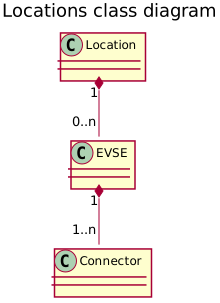
The Locations module has the Location as base object. Each Location can have multiple EVSEs (1:n) and each EVSE can have multiple Connectors (1:n). With the methods in the Receiver interface, Location data and status information can be shared with for example an eMSP and NSP. Updates can be made to a whole Location, but also only to an EVSE or a single Connector.
When a CPO creates Location objects, it pushes them to connected eMSP by calling PUT on the Receivers Locations endpoint. eMSPs who do not support Push mode need to call GET on the CPOs Locations endpoint to receive the new object. This should be done regularly to stay up to date with the CPOs data, but not too often in order to keep the load low.
If the CPO wants to replace a Location related object, they again push it to the eMSP systems by calling PUT on their Locations endpoint.
Any changes to a Location related object can also be pushed to connected eMSPs by calling the PATCH method on the eMSPs Locations endpoint, but using PATCH mode, only actual changes should be pushed. Providers who do not support Push mode need to call GET on the CPOs Locations endpoint to receive the updates.
When the CPO wants to delete an EVSE from the list of active EVSEs, they MUST update the EVSE’s status field to REMOVED
and call the PUT or PATCH on the eMSP system.
A Location without any valid EVSE object can be considered expired and should no longer be displayed.
There is no way to entirely delete Locations, EVSEs and Connectors as there are other modules like
sessions that depend on them.
If it was possible to remove these objects, those links would no longer work.
When the CPO is not sure about the state or existence of a Location, EVSE or Connector object in the eMSP’s system, the CPO can perform a GET request to validate the object in the eMSP’s system.
Private charging Locations, that are not to be used for public charging, SHALL NOT be published via OCPI.
1.1.1. No public charging or roaming
When a Location is not available for either Public Charging or Roaming, it is RECOMMENDED to NOT send that Location via OCPI to receiving parties.
1.1.2. Group of Charge Points
OCPP 2.0 supports a 3-tier model:
-
Highest level is a Charge Point
-
A Charge Point can have one or more EVSEs.
-
Every EVSE can have one or more Connectors.
OCPI does not have this model:
-
OCPI has Location at the highest level.
-
Each location can have multiple EVSE
-
Every EVSE can have one or more Connectors.
When mapping OCPP Charge Points to OCPI, there are 2 options:
-
One Location for a group of Charge Points at the same location. (preferred)
-
One Location per Charge Point at the same location.
OCPI prefers the first method. An EV driver does not care if a Location consists of one Charge Point with a very large amount of EVSEs, or a large amount of Charge Points with only one EVSE. The EV driver wants to know how many EVSEs are available. Grouping Charge Points in the same location into one OCPI Location will show better on a map that shows Charging Locations.
| By definition, an EVSE can only charge one EV at a time. |
1.1.3. OCPP 1.x Charge Points with multiple connectors per EVSE
OCPP 1.x was not designed to support the 3-tier model. It had no notion of EVSEs. The Open Charge Alliance has written an Application Note: "Multiple Connectors per EVSE in a OCPP 1.x implementation"
The workaround:
-
Define one 'virtual' EVSE per Connector.
-
When a connector of an hardware EVSE becomes unavailable, set all 'virtual' EVSEs for all the connectors of the hardware EVSE to unavailable. etc.
1.2. Interfaces and endpoints
There are both, a Sender and a Receiver interface for Locations. It is advised to use the Push direction from Sender to Receiver during normal operation in order to keep the latency of updates low. The Sender interface is meant to be used when the connection between two parties is established for the first time, to retrieve the current list of Location objects with the current status, and when the Receiver is not 100% sure the Location cache is entirely up-to-date (i.e. to perform a full sync). The Receiver can also use the Sender GET Object interface to retrieve a specific Location, EVSE or Connector. This feature might be used by an Receiver that wants information about a specific Location, but has not implemented the Receiver Locations interface (i.e. cannot receive Push).
1.2.1. Sender Interface
Typically implemented by market roles like: CPO.
| Method | Description |
|---|---|
Fetch a list of Locations, last updated between the |
|
POST |
n/a |
PUT |
n/a |
PATCH |
n/a |
DELETE |
n/a |
GET Method
Depending on the URL Segments provided, the GET request can either be used to retrieve information about a list of available Locations (with EVSEs and Connectors) at a CPO (GET List) or it can be used to retrieve information about one specific Location, EVSE or Connector (GET Object).
GET List: Request Parameters
Endpoint structure definition:
/locations?[date_from=
Examples:
https://www.server.com/ocpi/cpo/2.2.1/locations/?date_from=2019-01-28T12:00:00&date_to=2019-01-29T12:00:00
https://ocpi.server.com/2.2.1/locations/?offset=50
https://www.server.com/ocpi/2.2.1/locations/?date_from=2019-01-29T12:00:00&limit=100
https://www.server.com/ocpi/cpo/2.2.1/locations/?offset=50&limit=100
If the optional parameters last_updated) between the given last_updated field needs to be updated.
Similarly, if a Connector is updated, the EVSE’s last_updated and the Location’s last_updated fields need to be updated.
This request is paginated, it supports the pagination related URL parameters.
| Parameter | Datatype | Required | Description |
|---|---|---|---|
date_from |
no |
Only return Locations that have |
|
date_to |
no |
Only return Locations that have |
|
offset |
int |
no |
The offset of the first object returned. Default is 0. |
limit |
int |
no |
Maximum number of objects to GET. |
GET List: Response Data
This endpoint returns a list of Location objects. The header will contain the pagination related headers.
Each object must contain all required fields. Fields that are not specified may be considered as null values. Any old information that is not specified in the response is considered no longer valid. For requests that use pagination, the response data provided by all the pages together is the new truth. Any old information not contained in any of the pages needs to be considered no longer valid.
| Type | Card. | Description |
|---|---|---|
* |
List of all Locations with valid EVSEs. |
GET Object: Request Parameters
Endpoint structure definition for retrieving a Location, EVSE or Connector:
/locations/
Examples:
https://www.server.com/ocpi/cpo/2.2.1/locations/LOC1
https://www.server.com/ocpi/cpo/2.2.1/locations/LOC1/3256
https://www.server.com/ocpi/cpo/2.2.1/locations/LOC1/3256/1
The following parameters can be provided as URL segments in the same order.
| Parameter | Datatype | Required | Description |
|---|---|---|---|
location_id |
CiString(36) |
yes |
Location.id of the Location object to retrieve. |
evse_uid |
CiString(36) |
no |
Evse.uid, required when requesting an EVSE or Connector object. |
connector_id |
CiString(36) |
no |
Connector.id, required when requesting a Connector object. |
GET Object: Response Data
The response contains the requested object.
| Type | Card. | Description |
|---|---|---|
Choice: one of three |
||
> Location |
1 |
If a Location object was requested: the Location object. |
> EVSE |
1 |
If an EVSE object was requested: the EVSE object. |
1 |
If a Connector object was requested: the Connector object. |
1.2.2. Receiver Interface
Typically implemented by market roles like: eMSP and NSP.
Locations are Client Owned Objects, so the end-points need to contain the required extra fields: {party_id} and {country_code}.
Endpoint structure definition:
/locations/
Examples:
https://www.server.com/ocpi/emsp/2.2.1/locations/BE/BEC/LOC1
https://server.com/ocpi/2.2.1/locations/BE/BEC/LOC1/3256
https://ocpi.server.com/2.2.1/locations/BE/BEC/LOC1/3256/1
| Method | Description |
|---|---|
Retrieve a Location as it is stored in the eMSP system. |
|
POST |
n/a (use PUT) |
Push new/updated Location, EVSE and/or Connector to the eMSP. |
|
Notify the eMSP of partial updates to a Location, EVSE or Connector (such as the status). |
|
DELETE |
n/a (use PATCH to update the |
GET Method
If the CPO wants to check the status of a Location, EVSE or Connector object in the eMSP system, it might GET the object from the eMSP system for validation purposes. The CPO is the owner of the objects, so it would be illogical if the eMSP system had a different status or was missing an object. If a discrepancy is found, the CPO might push an update to the eMSP via a PUT or PATCH call.
Request Parameters
The following parameters can be provided as URL segments.
| Parameter | Datatype | Required | Description |
|---|---|---|---|
country_code |
CiString(2) |
yes |
Country code of the CPO requesting data from the eMSP system. |
party_id |
CiString(3) |
yes |
Party ID (Provider ID) of the CPO requesting data from the eMSP system. |
location_id |
CiString(36) |
yes |
Location.id of the Location object to retrieve. |
evse_uid |
CiString(36) |
no |
Evse.uid, required when requesting an EVSE or Connector object. |
connector_id |
CiString(36) |
no |
Connector.id, required when requesting a Connector object. |
PUT Method
The CPO pushes available Location, EVSE or Connector objects to the eMSP. PUT can be used to send new Location objects to the eMSP but also to replace existing Locations.
When the PUT only contains a Connector Object,
the Receiver SHALL also set the new last_updated value on the parent EVSE and Location Objects.
When the PUT only contains a EVSE Object,
the Receiver SHALL also set the new last_updated value on the parent Location Object.
Request Parameters
This is an information Push message, the objects pushed will not be owned by the eMSP. To make distinctions between objects being pushed to an eMSP from different CPOs, the {party_id} and {country_code} have to be included in the URL (as URL segments, as described in the Receiver Interface).
| Parameter | Datatype | Required | Description |
|---|---|---|---|
country_code |
CiString(2) |
yes |
Country code of the CPO requesting this PUT to the eMSP system. This SHALL be the same value as the |
party_id |
CiString(3) |
yes |
Party ID (Provider ID) of the CPO requesting this PUT to the eMSP system. This SHALL be the same value as the |
location_id |
CiString(36) |
yes |
Location.id of the new Location object, or the Location of which an EVSE or Connector object is pushed. |
evse_uid |
CiString(36) |
no |
Evse.uid, required when an EVSE or Connector object is pushed. |
connector_id |
CiString(36) |
no |
Connector.id, required when a Connector object is pushed. |
Request Body
The request body contains the new/updated object.
When the PUT contains a Connector Object,
the Receiver SHALL also set the new last_updated value on the parent EVSE and Location Objects.
When the PUT contains a EVSE Object,
the Receiver SHALL also set the new last_updated value on the parent Location Object.
| Type | Card. | Description |
|---|---|---|
Choice: one of three |
||
> Location |
1 |
New Location object, or Location object to replace. |
> EVSE |
1 |
New EVSE object, or EVSE object to replace. |
1 |
New Connector object, or Connector object to replace. |
Example: add an EVSE
To add an EVSE, simply put the full object in an update message, including all its required fields. Since the id will be new to the eMSP’s system, the receiving party will know that it is a new object. When not all required fields are specified, the object may be discarded.
PUT To URL: https://www.server.com/ocpi/emsp/2.2.1/locations/NL/TNM/1012/3256

{
  "uid": "3256",
  "evse_id": "BE*BEC*E041503003",
  "status": "AVAILABLE",
  "capabilities": ["RESERVABLE"],
  "connectors": [
    {
      "id": "1",
      "standard": "IEC_62196_T2",
      "format": "SOCKET",
      "tariff_ids": ["14"]
    }
  ],
  "floor": -1,
  "physical_reference": 3,
  "last_updated": "2019-06-24T12:39:09Z"
}
PATCH Method
Same as the PUT method, but only the fields/objects that have to be updated have to be present. Other fields/objects that are not specified as part of the request are considered unchanged. Therefore, this method is not suitable to remove information shared earlier.
Any request to the PATCH method SHALL contain the last_updated field.
When the PATCH is on a Connector Object,
the Receiver SHALL also set the new last_updated value on the parent EVSE and Location Objects.
When the PATCH is on a EVSE Object,
the Receiver SHALL also set the new last_updated value on the parent Location Object.
Example: a simple status update
This is the most common type of update message. It is used to notify eMSPs that the status of an EVSE changed.
In this case it is the EVSE with uid 3255 of the Location with id 1012.
PATCH To URL: https://www.server.com/ocpi/emsp/2.2.1/locations/NL/TNM/1012/3255

{
  "status": "CHARGING",
  "last_updated": "2019-06-24T12:39:09Z"
}
Example: change the location name
In this example the name of the Location with id 1012 is being updated.
PATCH To URL: https://www.server.com/ocpi/emsp/2.2.1/locations/NL/TNM/1012


{
  "name": "Interparking Gent Zuid",
  "last_updated": "2019-06-24T12:39:09Z"
}
Example: set tariff update
In this example Connector 2 of EVSE 1 of Location 1012 receives a new pricing scheme.
PATCH To URL: https://www.server.com/ocpi/emsp/2.2.1/locations/NL/TNM/1012/3255/2

{
  "tariff_ids": ["15"],
  "last_updated": "2019-06-24T12:39:09Z"
}
Example: delete an EVSE
An EVSE can be deleted by updating its status property.
PATCH To URL: https://www.server.com/ocpi/emsp/2.2.1/locations/NL/TNM/1012/3256

{
  "status": "REMOVED",
  "last_updated": "2019-06-24T12:39:09Z"
}| To inform eMSPs that an EVSE is scheduled for removal, the status_schedule field can be used._ |
1.3. Object description
Location, EVSE, Connector and Parking have the following relation:
1.3.1. Location Object
The Location object describes the location and its properties where a group of EVSEs that belong together are installed. Typically, the Location object is the exact location of the group of EVSEs, but it can also be the entrance of a parking garage which contains these EVSEs. The exact way to reach each EVSE can be further specified by its own properties.
Locations may be shown in apps or on websites etc. when the flag: publish is set to true.
Locations that have this flag set to false SHALL not be shown in an app or on a website etc. unless
it is to the owner of a Token in the publish_allowed_to list.
Even parties like NSP or eMSP that do not 'own' this Token MAY show this location on an app or website,
but only to the owner of that Token.
If the user of their app/website has provided information about his/her Token,
And that information matches all the fields of one of the PublishToken tokens in the list,
then they are allowed to show this location to their user.
It is not allowed in OCPI to use a Token that is not 'owned' by the eMSP itself to start a charging session.
| Property | Type | Card. | Description |
|---|---|---|---|
country_code |
CiString(2) |
1 |
ISO-3166 alpha-2 country code of the CPO that 'owns' this Location. |
party_id |
CiString(3) |
1 |
ID of the CPO that 'owns' this Location (following the ISO-15118 standard). |
id |
CiString(36) |
1 |
Uniquely identifies the location within the CPOs platform (and suboperator platforms). This field can never be changed, modified or renamed. |
publish |
boolean |
1 |
Defines if a Location may be published on an website or app etc. |
publish_allowed_to |
* |
This field may only be used when the |
|
name |
string(255) |
? |
Display name of the location. |
address |
string(45) |
1 |
Street/block name and house number if available. |
city |
string(45) |
1 |
City or town. |
postal_code |
string(10) |
? |
Postal code of the location, may only be omitted when the location has no postal code: in some countries charging locations at highways don’t have postal codes. |
state |
string(20) |
? |
State or province of the location, only to be used when relevant. |
country |
string(3) |
1 |
ISO 3166-1 alpha-3 code for the country of this location. |
coordinates |
1 |
Coordinates of the location. |
|
related_locations |
* |
Geographical location of related points relevant to the user. |
|
parking_type |
? |
The general type of parking at the charge point location. |
|
evses |
* |
List of EVSEs that belong to this Location. |
|
* |
List of parking places that can be used by vehicles charging at this Location. |
||
directions |
* |
Human-readable directions on how to reach the location. |
|
operator |
? |
Information of the operator. When not specified, the information retrieved from the Credentials module, selected by the |
|
suboperator |
? |
Information of the suboperator if available. |
|
owner |
? |
Information of the owner if available. |
|
facilities |
* |
Optional list of facilities this charging location directly belongs to. |
|
time_zone |
string(255) |
1 |
One of IANA tzdata’s TZ-values representing the time zone of the location. Examples: "Europe/Oslo", "Europe/Zurich". (http://www.iana.org/time-zones) |
opening_times |
? |
The times when the EVSEs at the location can be accessed for charging. |
|
charging_when_closed |
boolean |
? |
Indicates if the EVSEs are still charging outside the opening hours of the location. E.g. when the parking garage closes its barriers over night, is it allowed to charge till the next morning? Default: true |
images |
* |
Links to images related to the location such as photos or logos. |
|
energy_mix |
? |
Details on the energy supplied at this location. |
|
help_phone |
CiString(25) |
? |
A telephone number that a Driver using the Location may call for assistance. Calling this number will typically connect the caller to the CPO’s customer service department. |
last_updated |
1 |
Timestamp when this Location or one of its EVSEs or Connectors were last updated (or created). |
Private Charge Points, home or business that do not need to be published on apps, and do not require remote control via OCPI, SHOULD not be PUT via the OCPI Locations module.
Example public charging location
This is an example of a public charging location. Can be used by any EV Driver as long as his eMSP has a roaming agreement with the CPO. Or the Charge Point has an ad-hoc payment possibility
-
publish=true -
parking_type=ON_STREETbut could also be another value. -
EVSE.parking_restrictionsnot used.
{
  "country_code": "BE",
  "party_id": "BEC",
  "id": "LOC1",
  "publish": true,
  "name": "Gent Zuid",
  "address": "F.Rooseveltlaan 3A",
  "city": "Gent",
  "postal_code": "9000",
  "country": "BEL",
  "coordinates": {
    "latitude": "51.047599",
    "longitude": "3.729944"
  },
  "parking_type": "PARKING_GARAGE",
  "evses": [{
    "uid": "3256",
    "evse_id": "BE*BEC*E041503001",
    "status": "AVAILABLE",
    "capabilities": [
      "RESERVABLE"
    ],
    "connectors": [{
      "id": "1",
      "standard": "IEC_62196_T2",
      "format": "CABLE",
      "power_type": "AC_3_PHASE",
      "max_voltage": 220,
      "max_amperage": 16,
      "tariff_ids": ["11"],
      "last_updated": "2015-03-16T10:10:02Z"
    }, {
      "id": "2",
      "standard": "IEC_62196_T2",
      "format": "SOCKET",
      "power_type": "AC_3_PHASE",
      "max_voltage": 220,
      "max_amperage": 16,
      "tariff_ids": ["13"],
      "last_updated": "2015-03-18T08:12:01Z"
    }],
    "parking": [
      {"parking_id": "1", "evse_position": "LEFT"},
      {"parking_id": "2", "evse_position": "RIGHT"}
    ],
    "physical_reference": "1",
    "floor_level": "-1",
    "last_updated": "2015-06-28T08:12:01Z"
  }, {
    "uid": "3257",
    "evse_id": "BE*BEC*E041503002",
    "status": "RESERVED",
    "capabilities": [
      "RESERVABLE"
    ],
    "connectors": [{
      "id": "1",
      "standard": "IEC_62196_T2",
      "format": "SOCKET",
      "power_type": "AC_3_PHASE",
      "max_voltage": 220,
      "max_amperage": 16,
      "tariff_ids": ["12"],
      "last_updated": "2015-06-29T20:39:09Z"
    }],
    "parking": [
      {"parking_id": "2", "evse_position" :"LEFT"},
      {"parking_id": "3", "evse_position": "RIGHT"}
    ],
    "physical_reference": "2",
    "floor_level": "-2",
    "last_updated": "2015-06-29T20:39:09Z"
  }],
  "parking_places": [{
      "id": "1",
      "physical_reference": "B1",
      "vehicle_types": ["PERSONAL_VEHICLE"],
      "reservation_required": false,
      "restricted_to_type": true
    }, {
      "id": "2",
      "physical_reference": "B2",
      "vehicle_types": ["PERSONAL_VEHICLE"],
      "reservation_required": false,
      "restricted_to_type": true
    },
    {
      "id": "3",
      "physical_reference": "B3",
      "vehicle_types": ["PERSONAL_VEHICLE"],
      "reservation_required": false,
      "restricted_to_type": true
    }
  ],
  "operator": {
    "name": "BeCharged"
  },
  "time_zone": "Europe/Brussels",
  "last_updated": "2015-06-29T20:39:09Z"
}
Example destination charging location
This is an example of a destination charging location. This is a Location where only guests, employees or customers can charge. For an EV driver, it can be useful to know if he/she can charge at his destination.
For example at a restaurant, only customers of the restaurant can charge their EV. Or at an office building where employees and guest of the office can charge their EV.
Locations you can think of where this is useful: restaurants, bars, clubs, theme parks, stores, supermarkets, company building, office buildings, etc.
-
publish=true -
parking_type=PARKING_LOT(but could also bePARKING_GARAGE,ON_DRIVEWAYorUNDERGROUND_GARAGE) -
EVSE.parking_restrictions=CUSTOMERS
{
  "country_code": "NL",
  "party_id": "ALF",
  "id": "3e7b39c2-10d0-4138-a8b3-8509a25f9920",
  "publish": true,
  "name": "ihomer",
  "address": "Tamboerijn 7",
  "city": "Etten-Leur",
  "postal_code": "4876 BS",
  "country": "NLD",
  "coordinates": {
    "latitude": "51.562787",
    "longitude": "4.638975"
  },
  "parking_type": "PARKING_LOT",
  "evses": [{
    "uid": "fd855359-bc81-47bb-bb89-849ae3dac89e",
    "evse_id": "NL*ALF*E000000001",
    "status": "AVAILABLE",
    "connectors": [{
      "id": "1",
      "standard": "IEC_62196_T2",
      "format": "SOCKET",
      "power_type": "AC_3_PHASE",
      "max_voltage": 220,
      "max_amperage": 16,
      "last_updated": "2019-07-01T12:12:11Z"
    }],
    "parking_restrictions": [ "CUSTOMERS" ],
    "last_updated": "2019-07-01T12:12:11Z"
  }],
  "time_zone": "Europe/Amsterdam",
  "last_updated": "2019-07-01T12:12:11Z"
}
Example destination charging location not published, but paid guest usage possible
This is an example of a destination charging location. But the owner of the location has requested not to publish the location in Apps or on websites.
Charging is still possible: EV drivers of an eMSP with a roaming agreement can still charge their EV. The eMSP helpdesk can use the information from the Location module to help the driver, maybe even start a session for a driver. Starting a session from an App is not possible, because the driver will not be able to select the Charge Point on a map.
In case the EV driver is not billed for charging, there is, in such a case, no reason to publish the location via OCPI.
-
publish=false -
publish_allowed_tonot used -
parking_type= not used` -
EVSE.parking_restrictions=CUSTOMERSmay still be useful so a support desk can also tell this to a customer.
{
  "country_code": "NL",
  "party_id": "ALF",
  "id": "3e7b39c2-10d0-4138-a8b3-8509a25f9920",
  "publish": false,
  "name": "ihomer",
  "address": "Tamboerijn 7",
  "city": "Etten-Leur",
  "postal_code": "4876 BS",
  "country": "NLD",
  "coordinates": {
    "latitude": "51.562787",
    "longitude": "4.638975"
  },
  "evses": [{
    "uid": "fd855359-bc81-47bb-bb89-849ae3dac89e",
    "evse_id": "NL*ALF*E000000001",
    "status": "AVAILABLE",
    "connectors": [{
      "id": "1",
      "standard": "IEC_62196_T2",
      "format": "SOCKET",
      "power_type": "AC_3_PHASE",
      "max_voltage": 220,
      "max_amperage": 16,
      "last_updated": "2019-07-01T12:12:11Z"
    }],
    "parking_restrictions": [ "CUSTOMERS" ],
    "last_updated": "2019-07-01T12:12:11Z"
  }],
  "time_zone": "Europe/Amsterdam",
  "last_updated": "2019-07-01T12:12:11Z"
}
Example charging location with limited visibility
This is an example of a charging location that only a limited group can see (and use) via an App or website.
Typical examples where this is useful:
-
Charge Points in the parking garage of an apartment building. Only owners can see/control the Charge Points.
-
Charge Points at an office, for employees only. Only employees can see/control the Charge Points.
-
Charge Points at vehicle depot. Any employee can see/control an charge point, even transaction they did not start. Use
group_idfor this.
The locations SHALL NOT be published to the general public. Only selected Tokens can see (and control) the Charge Points via eMSP app.
-
publish=false -
publish_allowed_tocontains list with information of Tokens that are allowed to be shown theLocation. -
parking_type=UNDERGROUND_GARAGE(but could also bePARKING_GARAGE,ON_DRIVEWAYorPARKING_LOT)
{
  "country_code": "NL",
  "party_id": "ALL",
  "id": "f76c2e0c-a6ef-4f67-bf23-6a187e5ca0e0",
  "publish": false,
  "publish_allowed_to": [{
    "visual_number": "12345-67",
    "issuer": "NewMotion"
  }, {
    "visual_number": "0055375624",
    "issuer": "ANWB"
  }, {
    "uid": "12345678905880",
    "type": "RFID"
  }],
  "name": "Water State",
  "address": "Taco van der Veenplein 12",
  "city": "Leeuwarden",
  "postal_code": "8923 EM",
  "country": "NLD",
  "coordinates": {
    "latitude": "53.213763",
    "longitude": "5.804638"
  },
  "parking_type": "UNDERGROUND_GARAGE",
  "evses": [{
    "uid": "8c1b3487-61ac-40a7-a367-21eee99dbd90",
    "evse_id": "NL*ALL*EGO0000013",
    "status": "AVAILABLE",
    "connectors": [{
      "id": "1",
      "standard": "IEC_62196_T2",
      "format": "SOCKET",
      "power_type": "AC_3_PHASE",
      "max_voltage": 230,
      "max_amperage": 16,
      "last_updated": "2019-09-27T00:19:45Z"
    }],
    "last_updated": "2019-09-27T00:19:45Z"
  }],
  "time_zone": "Europe/Amsterdam",
  "last_updated": "2019-09-27T00:19:45Z"
}
Example private charge point with eMSP app control
This is an example of a private/home charge point that needs to be controlled via an eMSP App.
The locations SHALL NOT be published to the general public. Only the owner, identified by his/her Token can see (and control) the Charge Points via an eMSP app.
-
publish=false -
publish_allowed_tocontains the information of the Tokens of the owner. -
parking_type= not used, not relevant, owner knows where his Charge Point is.
{
  "country_code": "DE",
  "party_id": "ALL",
  "id": "a5295927-09b9-4a71-b4b9-a5fffdfa0b77",
  "publish": false,
  "publish_allowed_to": [{
    "visual_number": "0123456-99",
    "issuer": "MoveMove"
  }],
  "address": "Krautwigstraße 283A",
  "city": "Köln",
  "postal_code": "50931",
  "country": "DEU",
  "coordinates": {
    "latitude": "50.931826",
    "longitude": "6.964043"
  },
  "parking_type": "ON_DRIVEWAY",
  "evses": [{
    "uid": "4534ad5f-45be-428b-bfd0-fa489dda932d",
    "evse_id": "DE*ALL*EGO0000001",
    "status": "AVAILABLE",
    "connectors": [{
      "id": "1",
      "standard": "IEC_62196_T2",
      "format": "SOCKET",
      "power_type": "AC_1_PHASE",
      "max_voltage": 230,
      "max_amperage": 8,
      "last_updated": "2019-04-05T17:17:56Z"
    }],
    "last_updated": "2019-04-05T17:17:56Z"
  }],
  "time_zone": "Europe/Berlin",
  "last_updated": "2019-04-05T17:17:56Z"
}
Example charge point in a parking garage with opening hours
This is an example of a charge point, located in a parking garage with limited opening hours: 7:00 - 18:00.
If the EV is left in the parking garage overnight, the car will still be charged.
-
publish=true -
parking_type=PARKING_GARAGEbut could also be another value. -
EVSE.parking_restrictionsnot used. -
opening_timesis used. -
charging_when_closed=true
{
  "country_code": "SE",
  "party_id": "EVC",
  "id": "cbb0df21-d17d-40ba-a4aa-dc588c8f98cb",
  "publish": true,
  "name": "P-Huset Leonard",
  "address": "Claesgatan 6",
  "city": "Malmö",
  "postal_code": "214 26",
  "country": "SWE",
  "coordinates": {
    "latitude": "55.590325",
    "longitude": "13.008307"
  },
  "parking_type": "PARKING_GARAGE",
  "evses": [{
    "uid": "eccb8dd9-4189-433e-b100-cc0945dd17dc",
    "evse_id": "SE*EVC*E000000123",
    "status": "AVAILABLE",
    "connectors": [{
      "id": "1",
      "standard": "IEC_62196_T2",
      "format": "SOCKET",
      "power_type": "AC_3_PHASE",
      "max_voltage": 230,
      "max_amperage": 32,
      "last_updated": "2017-03-07T02:21:22Z"
    }],
    "parking": [{
      "parking_id": "000e3877-87bf-473e-8e71-70d3aa6d64ea",
      "evse_position": "CENTER"
    }],
    "last_updated": "2017-03-07T02:21:22Z"
  }],
  "parking_places": [{
    "id": "000e3877-87bf-473e-8e71-70d3aa6d64ea",
    "physical_reference": "A0",
    "vehicle_types": ["PERSONAL_VEHICLE"],
    "reservation_required": false,
    "restricted_to_type": true
  }],
  "time_zone": "Europe/Stockholm",
  "opening_times": {
    "twentyfourseven": false,
    "regular_hours": [{
      "weekday": 1,
      "period_begin": "07:00",
      "period_end": "18:00"
    }, {
      "weekday": 2,
      "period_begin": "07:00",
      "period_end": "18:00"
    },{
      "weekday": 3,
      "period_begin": "07:00",
      "period_end": "18:00"
    },{
      "weekday": 4,
      "period_begin": "07:00",
      "period_end": "18:00"
    },{
      "weekday": 5,
      "period_begin": "07:00",
      "period_end": "18:00"
    },{
      "weekday": 6,
      "period_begin": "07:00",
      "period_end": "18:00"
    },{
      "weekday": 7,
      "period_begin": "07:00",
      "period_end": "18:00"
    }]
  },
  "charging_when_closed": true,
  "last_updated": "2017-03-07T02:21:22Z"
}
1.3.2. EVSE Object
The EVSE object describes the part that controls the power supply to a single EV in a single session. It always belongs to a Location object. The object only contains directions to get from the location itself to the EVSE (i.e. floor, physical_reference or directions).
When the directional properties of an EVSE are insufficient to reach the EVSE from the Location point, then it typically indicates that the EVSE should be put in a different Location object (sometimes with the same address but with different coordinates/directions).
An EVSE object has a list of Connectors which can not be used simultaneously: only one connector per EVSE can be used at the time.
| Property | Type | Card. | Description |
|---|---|---|---|
uid |
CiString(36) |
1 |
Uniquely identifies the EVSE within the CPOs platform (and suboperator platforms). This field can never be changed, modified or renamed. This is the 'technical' identification of the EVSE, not to be used as 'human readable' identification, use the field |
evse_id |
CiString(48) |
? |
Compliant with the following specification for EVSE ID: "E-mobility ID-codes: the purpose of IDs, ID usage and ID format" (https://evroaming.org/contract-evse-ids/). Optional because: if an |
status |
1 |
Indicates the current status of the EVSE. |
|
status_schedule |
* |
Indicates a planned status update of the EVSE. |
|
capabilities |
* |
List of functionalities that the EVSE is capable of. |
|
connectors |
+ |
List of available connectors on the EVSE. |
|
floor_level |
string(4) |
? |
Level on which the Charge Point is located (in garage buildings) in the locally displayed numbering scheme. |
coordinates |
? |
Coordinates of the EVSE. |
|
physical_reference |
string(16) |
? |
A number/string printed on the outside of the EVSE for visual identification. |
directions |
* |
Multi-language human-readable directions when more detailed information on how to reach the EVSE from the Location is required. |
|
parking_restrictions |
* |
All applicable restrictions on who can charge at the EVSE, apart from those related to the vehicle type. |
|
parking |
* |
References to the parking space or spaces that can be used by vehicles charging at this EVSE. |
|
images |
* |
Links to images related to the EVSE such as photos or logos. |
|
accepted_service_providers |
String[50] |
* |
A list of the names of the eMSPs offering contract-based payment options that are accepted at this EVSE. |
last_updated |
1 |
Timestamp when this EVSE or one of its Connectors was last updated (or created). |
OCPP 1.x does not have good support for Charge Points that have multiple connectors per EVSE.
To make StartSession over OCPI work, the CPO SHOULD present the different connectors of an EVSE as separate EVSE,
as is also written by the OCA in the application note: "Multiple Connectors per EVSE in a OCPP 1.x implementation".
|
1.3.3. Connector Object
A Connector is the socket or cable and plug available for the EV to use. A single EVSE may provide multiple Connectors but only one of them can be in use at the same time. A Connector always belongs to an EVSE object.
| Property | Type | Card. | Description |
|---|---|---|---|
id |
CiString(36) |
1 |
Identifier of the Connector within the EVSE. Two Connectors may have the same id as long as they do not belong to the same EVSE object. |
standard |
1 |
The standard of the installed connector. |
|
format |
1 |
The format (socket/cable) of the installed connector. |
|
power_type |
1 |
||
max_voltage |
int |
1 |
Maximum voltage of the connector (line to neutral for AC_3_PHASE), in volt [V]. For example: DC Chargers might vary the voltage during charging when battery almost full. |
max_amperage |
int |
1 |
Maximum amperage of the connector, in ampere [A]. |
max_electric_power |
int |
? |
Maximum electric power that can be delivered by this connector, in Watts (W). When the maximum electric power is lower than the calculated value from |
tariff_ids |
CiString(36) |
* |
Identifiers of the currently valid charging tariffs.
Multiple tariffs are possible, but only one of each Tariff.type can be active at the same time.
Tariffs with the same type are only allowed if they are not active at the same time:
start_date_time and end_date_time period not overlapping. |
terms_and_conditions |
? |
URL to the operator’s terms and conditions. |
|
capabilities |
* |
A list of functionalities that the connector is capable of. |
|
last_updated |
1 |
Timestamp when this Connector was last updated (or created). |
1.3.4. Parking object
Describes a parking space that a vehicle can be parked in while charging.
For EVSEs around which no identifiable delineated parking spaces are available, a Parking object may describe the limitations that apply for parking near the EVSE without describing a specific space. This occurs a lot with streetside parking, for example.
| Parking objects were newly added in OCPI 2.3.0 relative to OCPI 2.2.1. The purpose of Parking objects is to allow CPOs in the EU to comply with requirements in the EU’s Alternative Fuel Infrasturcture Regulation (AFIR) which requires CPOs to report the number of parking spots and certain properties of those parking spots to NAPs. When CPOs are not talking to NAPs, or not under EU jurisdiction, they are free to not send Parking objects in their Locations. All Locations receivers who are not NAPs are free to ignore Parking objects in the Location data that they receive. |
| Property | Type | Card. | Description |
|---|---|---|---|
id |
CiString[36] |
1 |
The identifier for this parking space. The value of this field MUST be unique among all Parking objects in the same Location object. |
physical_reference |
String[12] |
? |
A string identifier for the parking place that is physically visible on-site to drivers using the parking space. This could be a short identifier painted on the surface of a parking place in a parking garage for example. |
vehicle_types |
+ |
The vehicle types that the parking is designed to accommodate. |
|
max_vehicle_weight |
number |
? |
The maximum vehicle weight that can park at the EVSE, in kilograms. A value for this field should be provided unless the value of the |
max_vehicle_height |
number |
? |
The maximum vehicle height that can park at the EVSE, in centimeters. A value for this field should be provided unless the value of the |
max_vehicle_length |
number |
? |
The maximum vehicle length that can park at the EVSE, in centimeters. A value for this field should be provided unless the value of the |
max_vehicle_width |
number |
? |
The maximum vehicle width that can park at the EVSE, in centimeters. A value for this field should be provided unless the value of the |
parking_space_length |
number |
? |
The length of the parking space, in centimeters. A value for this field should be provided unless the value of the |
parking_space_width |
number |
? |
The width of the parking space, in centimeters. A value for this field should be provided unless the value of the |
dangerous_goods_allowed |
boolean |
? |
Whether vehicles loaded with dangerous substances are allowed to park at the EVSE. A value for this field should be provided unless the value of the |
direction |
? |
The direction in which the vehicle is to be parked next to the EVSE. |
|
drive_through |
boolean |
? |
Whether a vehicle can stop, charge, and proceed without reversing into or out of a parking space. This should only be set to true if driving through is possible for all vehicle types listed in the |
restricted_to_type |
boolean |
1 |
Whether it is forbidden for vehicles of a type not listed in |
reservation_required |
boolean |
1 |
Whether a reservation is required for parking at the EVSE. |
time_limit |
number |
? |
A time limit. If this field is present, vehicles may not park in this parking longer than this number of minutes. |
roofed |
boolean |
? |
Whether the vehicle will be parked under a roof while charging. |
images |
* |
Photos of the parking space at the EVSE. At least one photograph should be provided if the value of |
|
lighting |
boolean |
? |
Whether the parking space for the EVSE is lit by artificial lighting. |
refrigeration_outlet |
boolean |
? |
Whether a power outlet is available to power a transport truck’s load refrigeration while the vehicle is parked. |
standards |
CiString[36] |
* |
A list of standards that the parking space conforms to, e.g. PAS 1899 for parking for people with disabilities. |
apds_reference |
? |
Reference to an Alliance for Parking Data Standards (APDS) element describing this parking. The referenced element may be a Place, Space or other hierarchy element defined by APDS. |
1.4. Data types
1.4.1. AdditionalGeoLocation class
This class defines an additional geo location that is relevant for the Charge Point. The geodetic system to be used is WGS 84.
| Property | Type | Card. | Description |
|---|---|---|---|
latitude |
string(10) |
1 |
Latitude of the point in decimal degree. Example: 50.770774. Decimal separator: "." Regex: |
longitude |
string(11) |
1 |
Longitude of the point in decimal degree. Example: -126.104965. Decimal separator: "." Regex: |
name |
? |
Name of the point in local language or as written at the location. For example the street name of a parking lot entrance or it’s number. |
1.4.2. BusinessDetails class
| Property | Type | Card. | Description |
|---|---|---|---|
name |
string(100) |
1 |
Name of the operator. |
website |
? |
Link to the operator’s website. |
|
logo |
? |
Image link to the operator’s logo. |
1.4.3. Capability OpenEnum
The capabilities of an EVSE.
| Value | Description |
|---|---|
CHARGING_PROFILE_CAPABLE |
The EVSE supports charging profiles. |
CHARGING_PREFERENCES_CAPABLE |
The EVSE supports charging preferences. |
CHIP_CARD_SUPPORT |
EVSE has a payment terminal that supports chip cards. |
CONTACTLESS_CARD_SUPPORT |
EVSE has a payment terminal that supports contactless cards. |
CREDIT_CARD_PAYABLE |
EVSE has a payment terminal that makes it possible to pay for charging using a credit card. |
DEBIT_CARD_PAYABLE |
EVSE has a payment terminal that makes it possible to pay for charging using a debit card. |
PED_TERMINAL |
EVSE has a payment terminal with a pin-code entry device. |
REMOTE_START_STOP_CAPABLE |
|
RESERVABLE |
The EVSE can be reserved. |
RFID_READER |
Charging at this EVSE can be authorized with an RFID token. |
START_SESSION_CONNECTOR_REQUIRED |
When a StartSession is sent to this EVSE, the MSP is required to add the optional |
TOKEN_GROUP_CAPABLE |
This EVSE supports token groups, two or more tokens work as one, so that a session can be started with one token and stopped with another (handy when a card and key-fob are given to the EV-driver). |
UNLOCK_CAPABLE |
Connectors have mechanical lock that can be requested by the eMSP to be unlocked. |
When a Charge Point supports ad-hoc payments with a payment terminal, please use a combination of the following values to explain the possibilities of the terminal: CHIP_CARD_SUPPORT, CONTACTLESS_CARD_SUPPORT, CREDIT_CARD_PAYABLE, DEBIT_CARD_PAYABLE, PED_TERMINAL.
There are Charge Points in the field that do not yet support OCPP 2.x. If these Charge Points have multiple connectors per EVSE, the CPO needs to know which connector to start when receiving a StartSession for the given EVSE. If this is the case, the CPO should set the START_SESSION_CONNECTOR_REQUIRED capability on the given EVSE.
1.4.4. ConnectorCapability OpenEnum
Functionalities that a Connector may or may not support.
| that these capabilities are meant to signal to eMSPs and their Drivers that a Driver can indeed use these functionalities at a Connector. Mere support for a standard by the charging hardware is not enough to warrant the presence of these capabilities. |
| Value | Description |
|---|---|
ISO_15118_2_PLUG_AND_CHARGE |
The Connector supports authentication of the Driver using a contract certificate stored in the vehicle according to ISO 15118-2. |
ISO_15118_20_PLUG_AND_CHARGE |
The Connector supports authentication of the Driver using a contract certificate stored in the vehicle according to ISO 15118-20. |
1.4.5. ConnectorFormat enum
The format of the connector, whether it is a socket or a plug.
| Value | Description |
|---|---|
SOCKET |
The connector is a socket; the EV user needs to bring a fitting plug. |
CABLE |
The connector is an attached cable; the EV users car needs to have a fitting inlet. |
1.4.6. ConnectorType OpenEnum
The socket or plug standard of the charging point.
| Value | Description |
|---|---|
CHADEMO |
The connector type is CHAdeMO, DC |
CHAOJI |
The ChaoJi connector. The new generation charging connector, harmonized between CHAdeMO and GB/T. DC. |
DOMESTIC_A |
Standard/Domestic household, type "A", NEMA 1-15, 2 pins |
DOMESTIC_B |
Standard/Domestic household, type "B", NEMA 5-15, 3 pins |
DOMESTIC_C |
Standard/Domestic household, type "C", CEE 7/17, 2 pins |
DOMESTIC_D |
Standard/Domestic household, type "D", 3 pin |
DOMESTIC_E |
Standard/Domestic household, type "E", CEE 7/5 3 pins |
DOMESTIC_F |
Standard/Domestic household, type "F", CEE 7/4, Schuko, 3 pins |
DOMESTIC_G |
Standard/Domestic household, type "G", BS 1363, Commonwealth, 3 pins |
DOMESTIC_H |
Standard/Domestic household, type "H", SI-32, 3 pins |
DOMESTIC_I |
Standard/Domestic household, type "I", AS 3112, 3 pins |
DOMESTIC_J |
Standard/Domestic household, type "J", SEV 1011, 3 pins |
DOMESTIC_K |
Standard/Domestic household, type "K", DS 60884-2-D1, 3 pins |
DOMESTIC_L |
Standard/Domestic household, type "L", CEI 23-16-VII, 3 pins |
DOMESTIC_M |
Standard/Domestic household, type "M", BS 546, 3 pins |
DOMESTIC_N |
Standard/Domestic household, type "N", NBR 14136, 3 pins |
DOMESTIC_O |
Standard/Domestic household, type "O", TIS 166-2549, 3 pins |
GBT_AC |
Guobiao GB/T 20234.2 AC socket/connector |
GBT_DC |
Guobiao GB/T 20234.3 DC connector |
IEC_60309_2_single_16 |
IEC 60309-2 Industrial Connector single phase 16 amperes (usually blue) |
IEC_60309_2_three_16 |
IEC 60309-2 Industrial Connector three phases 16 amperes (usually red) |
IEC_60309_2_three_32 |
IEC 60309-2 Industrial Connector three phases 32 amperes (usually red) |
IEC_60309_2_three_64 |
IEC 60309-2 Industrial Connector three phases 64 amperes (usually red) |
IEC_62196_T1 |
IEC 62196 Type 1 "SAE J1772" |
IEC_62196_T1_COMBO |
Combo Type 1 based, DC |
IEC_62196_T2 |
IEC 62196 Type 2 "Mennekes" |
IEC_62196_T2_COMBO |
Combo Type 2 based, DC |
IEC_62196_T3A |
IEC 62196 Type 3A |
IEC_62196_T3C |
IEC 62196 Type 3C "Scame" |
MCS |
The MegaWatt Charging System (MCS) connector as developed by CharIN |
NEMA_5_20 |
NEMA 5-20, 3 pins |
NEMA_6_30 |
NEMA 6-30, 3 pins |
NEMA_6_50 |
NEMA 6-50, 3 pins |
NEMA_10_30 |
NEMA 10-30, 3 pins |
NEMA_10_50 |
NEMA 10-50, 3 pins |
NEMA_14_30 |
NEMA 14-30, 3 pins, rating of 30 A |
NEMA_14_50 |
NEMA 14-50, 3 pins, rating of 50 A |
PANTOGRAPH_BOTTOM_UP |
On-board Bottom-up-Pantograph typically for bus charging |
PANTOGRAPH_TOP_DOWN |
Off-board Top-down-Pantograph typically for bus charging |
SAE_J3400 |
SAE J3400, also known as North American Charging Standard (NACS), developed by Tesla, Inc in 2021. |
TESLA_R |
Tesla Connector "Roadster"-type (round, 4 pin) |
TESLA_S |
Tesla Connector "Model-S"-type (oval, 5 pin). Mechanically compatible with SAE J3400 but uses CAN bus for communication instead of power line communication. |
1.4.7. EnergyMix class
This type is used to specify the energy mix and environmental impact of the supplied energy at a location or in a tariff.
| Property | Type | Card. | Description |
|---|---|---|---|
is_green_energy |
boolean |
1 |
True if 100% from regenerative sources. (CO2 and nuclear waste is zero) |
energy_sources |
* |
Key-value pairs (enum + percentage) of energy sources of this location’s tariff. |
|
environ_impact |
* |
Key-value pairs (enum + percentage) of nuclear waste and CO2 exhaust of this location’s tariff. |
|
supplier_name |
string(64) |
? |
Name of the energy supplier, delivering the energy for this location or tariff.* |
energy_product_name |
string(64) |
? |
Name of the energy suppliers product/tariff plan used at this location.* |
* These fields can be used to look up energy qualification or to show it directly to the customer (for well-known brands like Greenpeace Energy, etc.)
Examples
Tariff energy provider name:
  "energy_mix": {
    "is_green_energy": true,
    "supplier_name": "Greenpeace Energy eG",
    "energy_product_name": "eco-power"
  }
Complete:
  "energy_mix": {
    "is_green_energy": false,
    "energy_sources": [
    { "source": "GENERAL_GREEN",  "percentage": 35.9 },
    { "source": "GAS",            "percentage": 6.3  },
    { "source": "COAL",           "percentage": 33.2 },
    { "source": "GENERAL_FOSSIL", "percentage": 2.9  },
    { "source": "NUCLEAR",        "percentage": 21.7 }
    ],
    "environ_impact": [
    { "category": "NUCLEAR_WASTE",  "amount": 0.0006   },
    { "category": "CARBON_DIOXIDE", "amount": 372      }
    ],
    "supplier_name":       "E.ON Energy Deutschland",
    "energy_product_name": "E.ON DirektStrom eco"
  }
1.4.8. EnergySource class
Key-value pairs (enum + percentage) of energy sources. All given values of all categories should add up to 100 percent.
| Property | Type | Card. | Description |
|---|---|---|---|
source |
1 |
The type of energy source. |
|
percentage |
1 |
Percentage of this source (0-100) in the mix. |
1.4.9. EnergySourceCategory enum
Categories of energy sources.
| Value | Description |
|---|---|
NUCLEAR |
Nuclear power sources. |
GENERAL_FOSSIL |
All kinds of fossil power sources. |
COAL |
Fossil power from coal. |
GAS |
Fossil power from gas. |
GENERAL_GREEN |
All kinds of regenerative power sources. |
SOLAR |
Regenerative power from PV. |
WIND |
Regenerative power from wind turbines. |
WATER |
Regenerative power from water turbines. |
1.4.10. EnvironmentalImpact class
Amount of waste produced/emitted per kWh.
| Property | Type | Card. | Description |
|---|---|---|---|
category |
1 |
The environmental impact category of this value. |
|
amount |
1 |
Amount of this portion in g/kWh. |
1.4.11. EnvironmentalImpactCategory OpenEnum
Categories of environmental impact values.
| Value | Description |
|---|---|
NUCLEAR_WASTE |
Produced nuclear waste in grams per kilowatthour. |
CARBON_DIOXIDE |
Exhausted carbon dioxide in grams per kilowatthour. |
1.4.12. EVSEParking class
A link between an EVSE and a Parking object. The presence of an EVSEParking object in an EVSE indicates that a certain parking space can be used when charging at that EVSE.
| Property | Type | Card. | Description |
|---|---|---|---|
parking_id |
CiString[36] |
1 |
The ID of the Parking. The string in this field refers to a Parking object from the containing Location’s parking_places field by its |
evse_position |
? |
The position of the EVSE relative to the parking space. |
1.4.13. EVSEPosition enum
The position of an EVSE relative to the EVSE’s parking space.
| Value | Description |
|---|---|
LEFT |
The EVSE is to the left of the vehicle. For streetside parking, the CPO can assume the vehicle is facing the same way as traffic on the side of the road that the EVSE is on. This means that LEFT is used for all streetside parking in locales with left-hand traffic. For parking spaces leading sideways from a roadway, the CPO can assume the vehicle is parking with the nose away from the roadway (that is, entering the parking space driving forward). |
RIGHT |
The EVSE is to the right of the vehicle when parked. For streetside parking, the CPO can assume the vehicle is facing the same way as traffic on the side of the road that the EVSE is on. This means that RIGHT is used for all streetside parking in locales with right-hand traffic. For parking spaces leading sideways from a roadway, the CPO can assume the vehicle is parking with the nose away from the roadway (that is, entering the parking space driving forward). |
CENTER |
The EVSE is at the center of the impassable narrow end of a parking space. |
1.4.14. ExceptionalPeriod class
Specifies one exceptional period for opening or access hours.
| Property | Type | Card. | Description |
|---|---|---|---|
period_begin |
1 |
Begin of the exception. In UTC, |
|
period_end |
1 |
End of the exception. In UTC, |
1.4.15. Facility OpenEnum
| Value | Description |
|---|---|
HOTEL |
A hotel. |
RESTAURANT |
A restaurant. |
CAFE |
A cafe. |
MALL |
A mall or shopping center. |
SUPERMARKET |
A supermarket. |
SPORT |
Sport facilities: gym, field etc. |
RECREATION_AREA |
A recreation area. |
NATURE |
Located in, or close to, a park, nature reserve etc. |
MUSEUM |
A museum. |
BIKE_SHARING |
A bike/e-bike/e-scooter sharing location. |
BUS_STOP |
A bus stop. |
TAXI_STAND |
A taxi stand. |
TRAM_STOP |
A tram stop/station. |
METRO_STATION |
A metro station. |
TRAIN_STATION |
A train station. |
AIRPORT |
An airport. |
PARKING_LOT |
A parking lot. |
CARPOOL_PARKING |
A carpool parking. |
FUEL_STATION |
A Fuel station. |
WIFI |
Wifi or other type of internet available. |
1.4.16. GeoLocation class
This class defines the geo location of the Charge Point. The geodetic system to be used is WGS 84.
| Property | Type | Card. | Description |
|---|---|---|---|
latitude |
string(10) |
1 |
Latitude of the point in decimal degree. Example: 50.770774. Decimal separator: "." Regex: |
longitude |
string(11) |
1 |
Longitude of the point in decimal degree. Example: -126.104965. Decimal separator: "." Regex: |
| Five decimal places is seen as a minimum for GPS coordinates of the Charge Point as this gives approximately 1 meter precision. More is always better. Seven decimal places gives approximately 1cm precision. |
1.4.17. Hours class
Opening and access hours of the location.
| Property | Type | Card. | Description |
|---|---|---|---|
twentyfourseven |
boolean |
1 |
True to represent 24 hours a day and 7 days a week, except the given exceptions. |
regular_hours |
* |
Regular hours, weekday-based. Only to be used if |
|
exceptional_openings |
* |
Exceptions for specified calendar dates, time-range based. Periods the station is operating/accessible. Additional to |
|
exceptional_closings |
* |
Exceptions for specified calendar dates, time-range based. Periods the station is not operating/accessible. Overwriting |
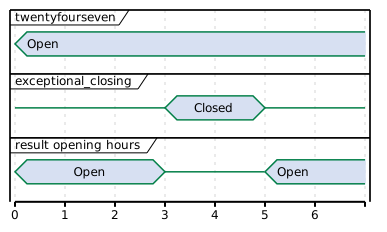
Example: 24/7 open with exceptional closing.
Open 24 hours per day, 7 days a week, except for 25th of December 2018 between 03:00 and 05:00.
{
  "twentyfourseven": true,
  "exceptional_closings": [{
    "period_begin": "2018-12-25T03:00:00Z",
    "period_end": "2018-12-25T05:00:00Z"
  }]
}
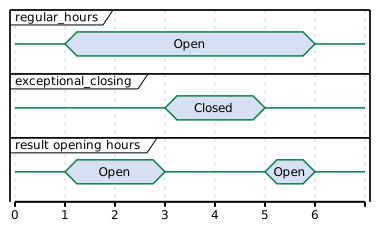
Example: Opening Hours with exceptional closing.
Regular opening hours between 01:00 and 06:00. With exceptional closing on 25th of December 2018 between 03:00 and 05:00.
{
  "twentyfourseven": false,
  "regular_hours": [{
    "weekday": 1,
    "period_begin": "01:00",
    "period_end": "06:00"
  }, {
    "weekday": 2,
    "period_begin": "01:00",
    "period_end": "06:00"
  }],
  "exceptional_closings": [{
    "period_begin": "2018-12-25T03:00:00Z",
    "period_end": "2018-12-25T05:00:00Z"
  }]
}
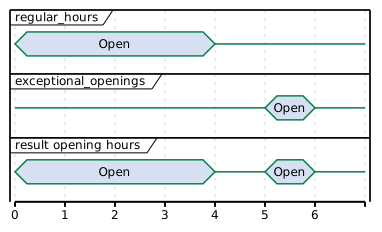
Example: Opening Hours with exceptional opening.
Regular opening hours between 00:00 and 04:00. With exceptional opening on 25th of December 2018 between 05:00 and 07:00.
{
  "twentyfourseven": false,
  "regular_hours": [{
    "weekday": 1,
    "period_begin": "00:00",
    "period_end": "04:00"
  }, {
    "weekday": 2,
    "period_begin": "00:00",
    "period_end": "04:00"
  }],
  "exceptional_openings": [{
    "period_begin": "2018-12-25T05:00:00Z",
    "period_end": "2018-12-25T06:00:00Z"
  }]
}
1.4.18. Image class
This class references an image related to an EVSE in terms of a file name or url. According to the roaming connection between one EVSE Operator and one or more Navigation Service Providers, the hosting or file exchange of image payload data has to be defined. The exchange of this content data is out of scope of OCPI. However, the recommended setup is a public available web server hosted and updated by the EVSE Operator. Per charge point an unlimited number of images of each type is allowed. Recommended are at least two images where one is a network or provider logo and the second is a station photo. If two images of the same type are defined, not only one should be selected but both should be displayed together.
Photo Dimensions: The recommended dimensions for all photos is a minimum width of 800 pixels and a minimum height of 600 pixels. Thumbnail should always have the same orientation as the original photo with a size of 200 by 200 pixels.
Logo Dimensions: The recommended dimensions for logos are exactly 512 pixels in width height. Thumbnail representations of logos should be exactly 128 pixels in width and height. If not squared, thumbnails should have the same orientation as the original.
| Property | Type | Card. | Description |
|---|---|---|---|
url |
1 |
URL from where the image data can be fetched through a web browser. |
|
thumbnail |
? |
URL from where a thumbnail of the image can be fetched through a webbrowser. |
|
category |
1 |
Describes what the image is used for. |
|
type |
CiString(4) |
1 |
Image type like: gif, jpeg, png, svg. |
width |
int(5) |
? |
Width of the full scale image. |
height |
int(5) |
? |
Height of the full scale image. |
1.4.19. ImageCategory OpenEnum
The category of an image to obtain the correct usage in a user presentation. The category has to be set accordingly to the image content in order to guarantee the right usage.
| Value | Description |
|---|---|
CHARGER |
Photo of the physical device that contains one or more EVSEs. |
ENTRANCE |
Location entrance photo. Should show the car entrance to the location from street side. |
LOCATION |
Location overview photo. |
NETWORK |
Logo of an associated roaming network to be displayed with the EVSE for example in lists, maps and detailed information views. |
OPERATOR |
Logo of the charge point operator, for example a municipality, to be displayed in the EVSEs detailed information view or in lists and maps, if no network logo is present. |
OTHER |
Other |
OWNER |
Logo of the charge point owner, for example a local store, to be displayed in the EVSEs detailed information view. |
1.4.20. ParkingDirection enum
Indicates the direction in which parking occurs relative to the roadway on which vehicles approach the EVSE.
| Value | Description |
|---|---|
PARALLEL |
Parking happens parallel to the roadway on which vehicles approach the EVSE. |
PERPENDICULAR |
Parking happens perpendicular to the roadway on which vehicles approach the EVSE. |
ANGLE |
Parking happens at an angle to the roadway on which vehicles approach the EVSE (i.e. echelon parking). |
1.4.21. ParkingRestriction OpenEnum
This value, if provided, represents the restriction to the parking spot for different purposes.
| Value | Description |
|---|---|
CUSTOMERS |
Parking spot for customers or guests only, for example in case of a hotel or shop. |
DISABLED |
Reserved parking spot for disabled people with valid ID. |
EMPLOYEES |
Parking only for people who work at a site, building, or complex that the Location belongs to. |
EV_ONLY |
Reserved parking spot for electric vehicles. |
MOTORCYCLES |
Parking spot only suitable for (electric) motorcycles or scooters. |
PLUGGED |
Parking is only allowed while plugged in (charging). |
TAXIS |
Parking only for taxi vehicles. |
TENANTS |
Parking only for people who live in a complex that the Location belongs to. |
1.4.22. ParkingType OpenEnum
Reflects the general type of the charge point’s location. May be used for user information.
| Value | Description |
|---|---|
ALONG_MOTORWAY |
Location on a parking facility/rest area along a motorway, freeway, interstate, highway etc. |
PARKING_GARAGE |
Multistorey car park. |
PARKING_LOT |
A cleared area that is intended for parking vehicles, i.e. at super markets, bars, etc. |
ON_DRIVEWAY |
Location is on the driveway of a house/building. |
ON_STREET |
Parking in public space along a street. |
UNDERGROUND_GARAGE |
Multistorey car park, mainly underground. |
1.4.23. PowerType enum
| Value | Description |
|---|---|
AC_1_PHASE |
AC single phase. |
AC_2_PHASE |
AC two phases, only two of the three available phases connected. |
AC_2_PHASE_SPLIT |
AC two phases using split phase system. |
AC_3_PHASE |
AC three phases. |
DC |
Direct Current. |
1.4.24. PublishTokenType class
Defines the set of values that identify a token to which a Location might be published.
At least one of the following fields SHALL be set: uid, visual_number, or group_id.
When uid is set, type SHALL also be set.
When visual_number is set, issuer SHALL also be set.
| Property | Type | Card. | Description |
|---|---|---|---|
uid |
CiString(36) |
? |
Unique ID by which this Token can be identified. |
type |
? |
Type of the token. |
|
visual_number |
string(64) |
? |
Visual readable number/identification as printed on the Token (RFID card). |
issuer |
string(64) |
? |
Issuing company, most of the times the name of the company printed on the token (RFID card), not necessarily the eMSP. |
group_id |
CiString(36) |
? |
This ID groups a couple of tokens. This can be used to make two or more tokens work as one. |
1.4.25. RegularHours class
Regular recurring operation or access hours.
| Property | Type | Card. | Description |
|---|---|---|---|
weekday |
int(1) |
1 |
Number of day in the week, from Monday (1) till Sunday (7) |
period_begin |
string(5) |
1 |
Begin of the regular period, in local time, given in hours and minutes. Must be in 24h format with leading zeros. Example: "18:15". Hour/Minute separator: ":" Regex: |
period_end |
string(5) |
1 |
End of the regular period, in local time, syntax as for |
Example
Operating on weekdays from 8am till 8pm with one exceptional opening on 22/6/2014 and one exceptional closing the Monday after:
  "opening_times": {
    "regular_hours": [
      {
        "weekday": 1,
        "period_begin": "08:00",
        "period_end": "20:00"
      },
      {
        "weekday": 2,
        "period_begin": "08:00",
        "period_end": "20:00"
      },
      {
        "weekday": 3,
        "period_begin": "08:00",
        "period_end": "20:00"
      },
      {
        "weekday": 4,
        "period_begin": "08:00",
        "period_end": "20:00"
      },
      {
        "weekday": 5,
        "period_begin": "08:00",
        "period_end": "20:00"
      }
    ],
    "twentyfourseven": false,
    "exceptional_openings": [
      {
        "period_begin": "2014-06-21T09:00:00Z",
        "period_end": "2014-06-21T12:00:00Z"
      }
    ],
    "exceptional_closings": [
      {
        "period_begin": "2014-06-24T00:00:00Z",
        "period_end": "2014-06-25T00:00:00Z"
      }
    ]
  }
This represents the following schedule, where stroked out days are without operation hours, bold days are where exceptions apply and regular displayed days are where the regular schedule applies.
| Weekday | Mo | Tu | We | Th | Fr | Sa | Su | Mo | Tu | We | Th | Fr | Sa | Su |
|---|---|---|---|---|---|---|---|---|---|---|---|---|---|---|
Date |
16 |
17 |
18 |
19 |
20 |
21 |
22 |
23 |
24 |
25 |
26 |
27 |
28 |
29 |
Open from |
08 |
08 |
08 |
08 |
08 |
09 |
|
08 |
|
08 |
08 |
08 |
|
|
Open till |
20 |
20 |
20 |
20 |
20 |
12 |
|
20 |
|
20 |
20 |
20 |
|
|
1.4.26. Status enum
The status of an EVSE.
| Value | Description |
|---|---|
AVAILABLE |
The EVSE/Connector is able to start a new charging session. |
BLOCKED |
The EVSE/Connector is not accessible because of a physical barrier, i.e. a car. |
CHARGING |
The EVSE/Connector is in use. |
INOPERATIVE |
The EVSE/Connector is not yet active, or temporarily not available for use, but not broken or defect. |
OUTOFORDER |
The EVSE/Connector is currently out of order, some part/components may be broken/defect. |
PLANNED |
The EVSE/Connector is planned, will be operating soon. |
REMOVED |
The EVSE/Connector was discontinued/removed. |
RESERVED |
The EVSE/Connector is reserved for a particular EV driver and is unavailable for other drivers. |
UNKNOWN |
No status information available (also used when offline). |
1.4.27. StatusSchedule class
This type is used to schedule status periods in the future. The eMSP can provide this information to the EV user for trip planning purposes. A period MAY have no end. Example: "This station will be running as of tomorrow. Today it is still planned and under construction."
| Property | Type | Card. | Description |
|---|---|---|---|
period_begin |
1 |
Begin of the scheduled period. |
|
period_end |
? |
End of the scheduled period, if known. |
|
status |
1 |
Status value during the scheduled period. |
The scheduled status is purely informational. When the status actually changes, the CPO must push an update to the EVSEs status field itself.
|
1.4.28. VehicleType OpenEnum
A categorization of vehicles to indicate which type of vehicles can use a certain EVSE. Approximate UNECE codes corresponding to our categories are given in the third column in the table.
| Value | Description | UNECE Code |
|---|---|---|
MOTORCYCLE |
A motorcycle |
L |
PERSONAL_VEHICLE |
A personal vehicle, a passenger car |
M1 |
PERSONAL_VEHICLE_WITH_TRAILER |
A personal vehicle with a trailer attached |
M1 + O |
VAN |
A light-duty van with a height smaller than 275 cm |
N1 |
SEMI_TRACTOR |
A heavy-duty tractor unit without a trailer |
T |
RIGID |
A heavy-duty truck without an articulation point |
N2 (under 12 tonnes) / N3 (over 12 tonnes) |
TRUCK_WITH_TRAILER |
A heavy-duty truck (tractor or rigid) with a trailer attached |
N2/N3 + O |
BUS |
A bus or a motor coach. |
M2 (under 5 tonnes) / M3 (over 5 tonnes) |
DISABLED |
A vehicle with a permit for parking spaces for people with disabilities |
M1 (assuming that these are typically based on personal vehicles) |
| It may seem surprising that OCPI uses a custom vehicle categorization scheme rather than one defined in another specification. During OCPI 3.0 development it appeared however that existing classifications, like the UNECE Classification and Definition of Vehicles, are overly detailed and technical and offer little help in making clear which vehicles can use a certain EVSE. For OCPI 3.0 we opted for a deliberately common sense based categorization that we believe will be easier to use for Drivers and CPOs. |