Payments
1. Payments module
Module Identifier: payments
Data owner: PTP
Type: Functional Module
This module should support the Payment Terminal use case for direct payment in the roaming world.
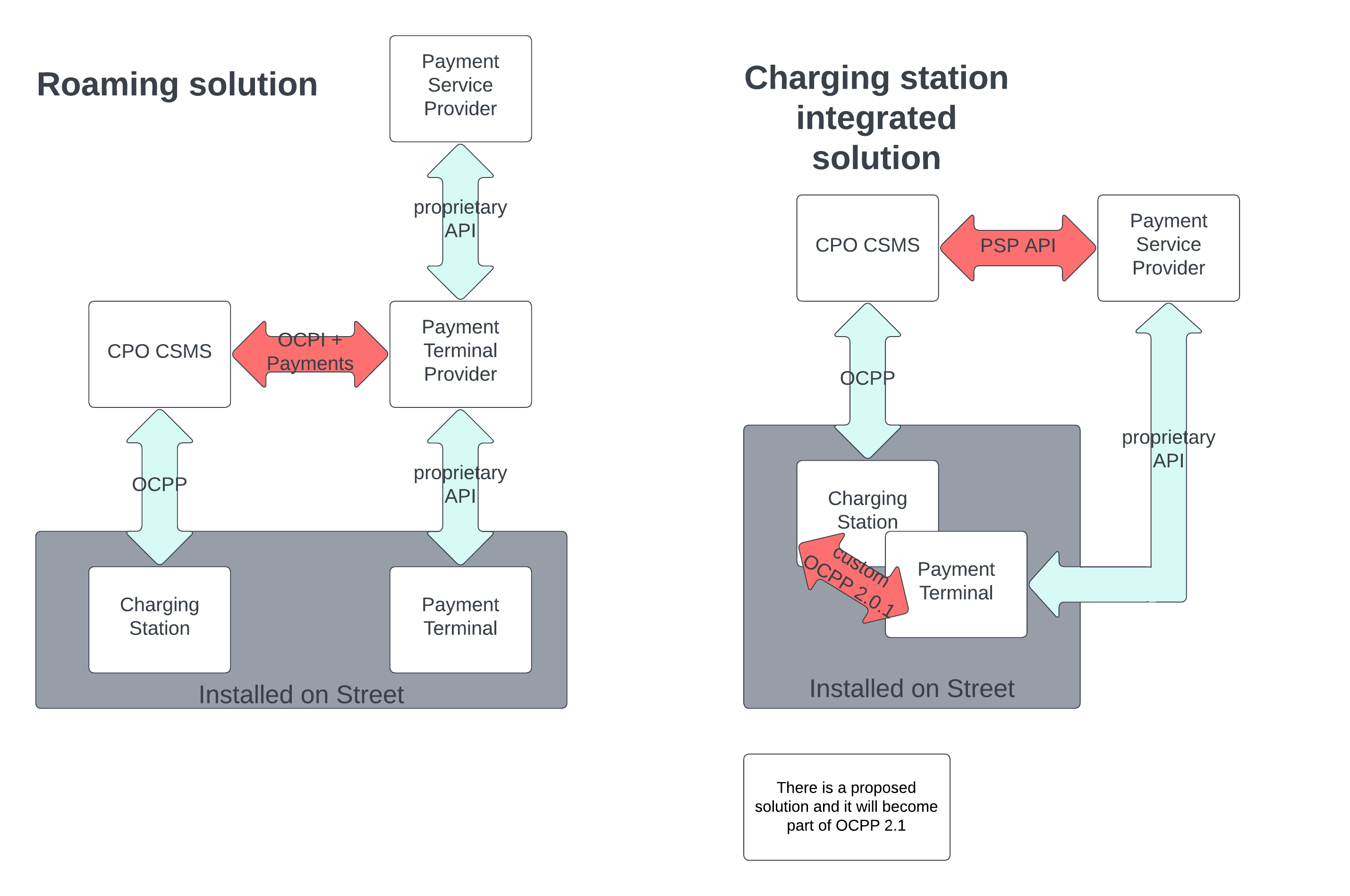
This should show the difference between roaming and an integrated charging station solution for direct payment support.
The module consists mainly of two objects: Terminal and Financial Advice Confirmation. A terminal can handle multiple locations and/or EVSEs. It should be able for a CPO to assign them to a terminal object. At the end of a charging session there should be a CDR sent. There should be also send a financial-advice-confirmation from the PTP. This should contain the actual cost and EFT data. This object is only needed if the CPO creates the invoice.
1.2. Terminal Assignment
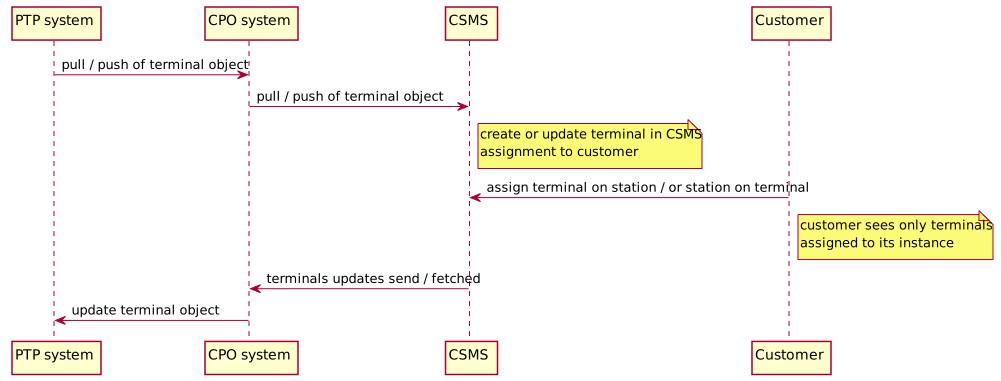
This flow shows the exchange and the assignment of the terminal object. This object will be owned and created by the PTP. After the object was pushed to/pulled by the CPO there will be the possibility to assign specific locations to this terminal. This assignment then will be pushed by the CPO to the PTP.
1.3. Terminal Activation
This flow shows a possible former activation of a payment terminal. Usually, this will be needed for payment terminals integrated into a station. Here the CPO orders a station from the OEM with an integrated payment terminal. The OEM will provide a reference to the CPO which can then be used for the terminal activation at the PTP. After the activation, the PTP will create a terminal object on the CPO side. This activation is needed as the PTP has to do several configuration steps in beforehand, like acquiring a unique ID for the given installation address.

1.4. Transaction
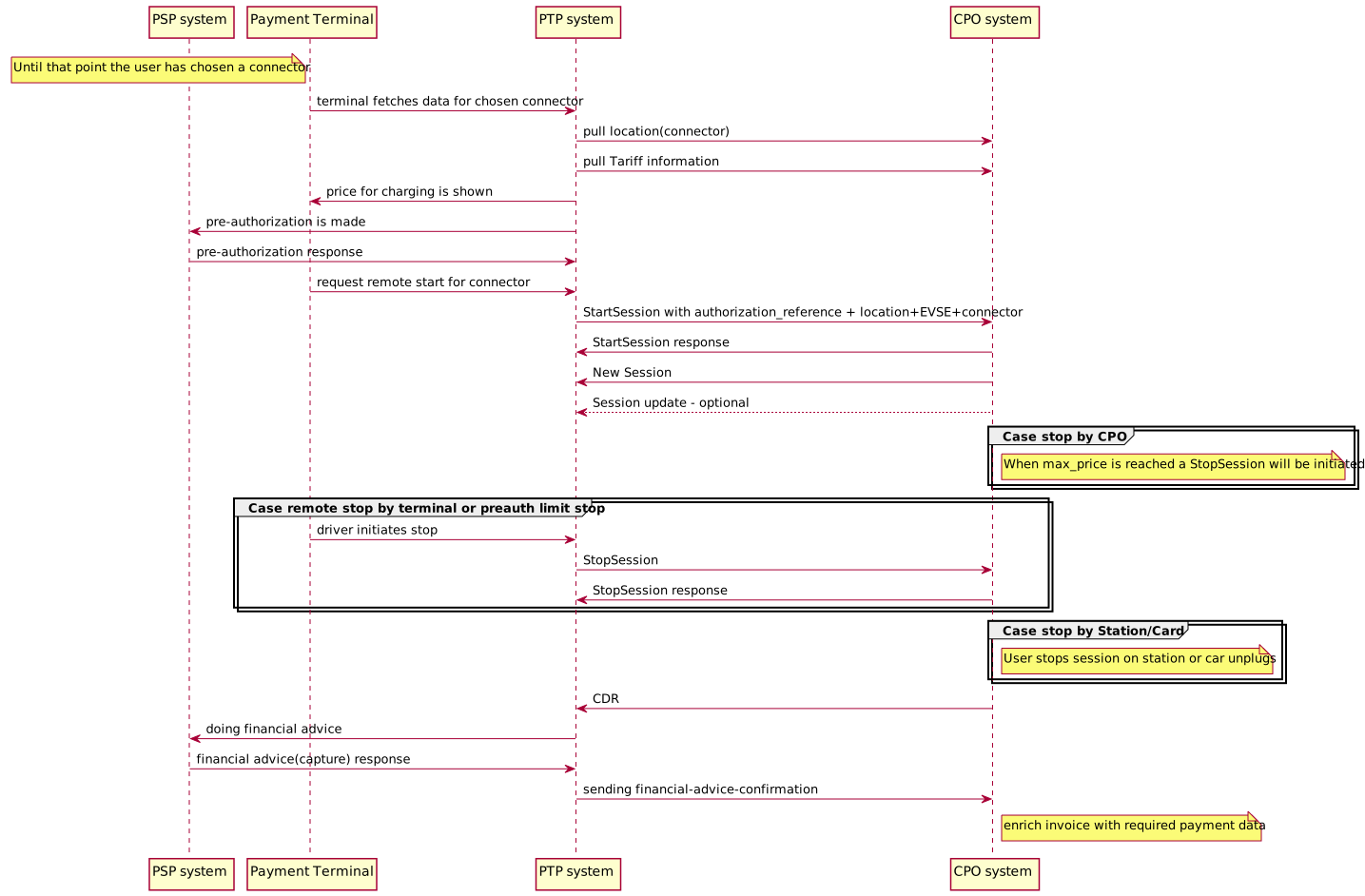
This flow shows a single transaction in total.
After choosing a specific connector on the terminal the PTP
has to pull the current connector information to receive
the applicable tariff_id.
With this id the tariff should be pulled so that it can be shown on the terminal.
Also the tariff is needed to reserve the needed preauth limit (stated in the preauthorize_amount field of the tariff) at the PSP.
When the user accepts the tariff the PTP will reserve the preauth amount at the PTP and a
StartSession command will be sent to the CPO. The PTP will pass an authorization_reference
with this request which will be used as the mapping for the invoice (e.g. as postfix of the invoice URL).
During the session there will be session updates pushed by the CPO if existing.
For stopping the session there are 3 ways:
-
can be stopped by the car or by the station
-
a StopSession can be sent by the PTP when the preauth limit is reached
-
can also be stopped by the CPO backend if the preauth limit is reached
Now the PTP will receive a CDR with an filled invoice_reference_id. If this id is set then the invoice was created by the CPO, if not then the invoice will be created by the PTP. If the CPO creates the invoice, the PTP has to push a financial-advice-confirmation object after he has done the capture at the PSP. When the CPO has received this object the previously created invoice has to be enriched with the required EFT data.
1.5. Interfaces and Endpoints
1.5.1. Sender Interface
Typically implemented by market roles like: PTP.
Terminals Interface
| Method | Description |
|---|---|
Fetch Terminal objects last updated between the |
|
Fetch a Terminal object by its ID. |
|
Activate a Terminal. |
|
Deactivate a Terminal. |
|
Updating a Terminal object. |
|
Updating a Terminal object(Location assignment) |
Financial Advice Confirmation Interface
| Method | Description |
|---|---|
Fetch Financial Advice Confirmation objects last updated between the |
|
Fetch a Financial Advice Confirmation object by its ID. |
GET Terminals Method
Fetch Terminals from a PTP system.
Endpoint structure definition:
/payments/terminals?[date_from=
Examples:
https://www.server.com/ocpi/ptp/2.2.1/payments/terminals/?date_from=2019-01-28T12:00:00&date_to=2019-01-29T12:00:00
https://ocpi.server.com/2.2.1/payments/terminals/?offset=50
https://www.server.com/ocpi/2.2.1/payments/terminals/?date_from=2019-01-29T12:00:00&limit=100
https://www.server.com/ocpi/ptp/2.2.1/payments/terminals/?offset=50&limit=100
Request Parameters
If the optional parameters date from and/or date to are provided, only Terminals with last_update between the given
This request is paginated, it supports the pagination related URL parameters.
| Parameter | Datatype | Required | Description |
|---|---|---|---|
date_from |
no |
Only return Sessions that have |
|
date_to |
no |
Only return Sessions that have |
|
offset |
int |
no |
The offset of the first object returned. Default is 0. |
limit |
int |
no |
Maximum number of objects to GET. |
Response Data
The response contains a list of Terminals objects that match the given parameters in the request, the header will contain the pagination related headers.
Any older information that is not specified in the response is considered no longer valid. Each object must contain all required fields. Fields that are not specified may be considered as null values.
| Datatype | Card. | Description |
|---|---|---|
* |
List of Terminal objects that match the request parameters. |
GET Terminal Method
If the CPO wants to check the status of a Terminal object in the PTP system, it might GET the object from the PTP system for validation purposes.
Request Parameters
The following parameters can be provided as URL segments.
| Parameter | Datatype | Required | Description |
|---|---|---|---|
terminal_id |
CiString(36) |
yes |
Terminal.terminal id of the Terminal object to retrieve. |
Response Data
The response contains the requested object.
| Type | Card. | Description |
|---|---|---|
> Terminal |
1 |
Requested Terminal. |
PATCH Terminal Method
This PATCH should be used by the CPO to assign location ids and/or evse_uids to a terminal. When sending both location_ids and evse_uids then both have to be considered and the sum of evses will be enabled for this payment terminal.
Request Parameters
This is an information Push message, the objects pushed will not be owned by the CPO.
| Parameter | Datatype | Required | Description |
|---|---|---|---|
terminal_id |
CiString(36) |
yes |
Terminal.terminal id of the Terminal object to update. |
Example: Assign Location IDs to Terminal
This is the expected type of update message. It is used to assign Location ids to a terminal.
PATCH To URL: https://www.server.com/ocpi/ptp/2.2.1/payments/terminals/55719888-
ed09-4cca-82cc-803bdb77bf26

{
  "location_ids": [
    "df37373d-1669-4127-a6ac-d86750095119",
    "a06dc823-3e5a-40c8-89cf-1b5b9e941412",
    "55719888-ed09-4cca-82cc-803bdb77bf26"
  ]
}
PUT Terminal Method
This PUT should be used by the CPO to update location data of a terminal.
Request Parameters
This is an information Push message, the objects pushed will not be owned by the CPO.
| Parameter | Datatype | Required | Description |
|---|---|---|---|
terminal_id |
CiString(36) |
yes |
Terminal.terminal id of the Terminal object to update. |
Request Body
The request body contains the updated object.
| Type | Card. | Description |
|---|---|---|
> Terminal |
1 |
Terminal object to update. |
POST Activate Terminal Method
This POST request should be used by the CPO to activate a terminal with needed information on the PTP side. Activation of a terminal may be needed for payment terminals integrated into a station. Here the CPO has to give the PTP needed information to link the payment terminal to the location/evse. This can be done for example via the serial number or other mappings sent via the reference. After receiving an activation request the PTP should start the Terminal creation process by creating a Terminal object on the CPO side with calling the corresponding POST endpoint.
Endpoint structure definition:
/payments/terminals/activate
Examples:
+https://www.server.com/ocpi/ptp/2.2.1/payments/terminals/activate
Request Body
The request body contains an Terminal to activate.
| The terminal_id is optional in the activation request as it will be set by the PTP. The cardinality for the remaining fields stays the same. |
| Type | Card. | Description |
|---|---|---|
> Terminal |
1 |
Terminal object to update. |
Example: Activating a Terminal with basic data
POST To URL: https://www.server.com/ocpi/ptp/2.2.1/payments/terminals/activate

{
  "terminal_id": "a06dc823-3e5a-40c8-89cf-1b5b9e941412",
  "location_ids": [
    "df37373d-1669-4127-a6ac-d86750095119"
  ],
  "reference": "Term-SerialNumber",
  "last_updated": "2019-12-10T17:16:15Z"
}
POST Deactivate Terminal Method
This POST request should be used by the CPO to deactivate a given terminal. This may be necessary when the terminal is broken or there is an address change for the given terminal.
Endpoint structure definition:
/payments/terminals/
Examples:
+https://www.server.com/ocpi/ptp/2.2.1/payments/terminals/55719888-
ed09-4cca-82cc-803bdb77bf26/deactivate
GET Financial Advice Confirmations Method
Fetch Financial Advice Confirmations from a PTP system.
Endpoint structure definition:
/payments/financial_advice_confirmations?[date_from=
Examples:
https://www.server.com/ocpi/ptp/2.2.1/payments/financial-advice-confirmations/?date_from=2019-01-28T12:00:00&date_to=2019-01-29T12:00:00
https://ocpi.server.com/2.2.1/payments/financial-advice-confirmations/?offset=50
https://www.server.com/ocpi/2.2.1/payments/financial-advice-confirmations/?date_from=2019-01-29T12:00:00&limit=100
https://www.server.com/ocpi/ptp/2.2.1/payments/financial-advice-confirmations/?offset=50&limit=100
Request Parameters
If the optional parameters date from and/or date to are provided, only Financial Advice Confirmations with last_update between the given
This request is paginated, it supports the pagination related URL parameters.
| Parameter | Datatype | Required | Description |
|---|---|---|---|
date_from |
no |
Only return Sessions that have |
|
date_to |
no |
Only return Sessions that have |
|
offset |
int |
no |
The offset of the first object returned. Default is 0. |
limit |
int |
no |
Maximum number of objects to GET. |
Response Data
The response contains a list of Financial Advice Confirmation objects that match the given parameters in the request, the header will contain the pagination related headers.
Any older information that is not specified in the response is considered no longer valid. Each object must contain all required fields. Fields that are not specified may be considered as null values.
| Datatype | Card. | Description |
|---|---|---|
* |
List of Financial Advice Confirmation objects that match the request parameters. |
GET Financial Advice Confirmation Method
If the CPO wants to check the status of a Financial Advice Confirmations object in the PTP system, it might GET the object from the PTP system for validation purposes.
Request Parameters
The following parameters can be provided as URL segments.
| Parameter | Datatype | Required | Description |
|---|---|---|---|
financial_advice_confirmation_id |
CiString(36) |
yes |
Financial Advice confirmation.id of the financial advice confirmation object to retrieve. |
1.5.2. Receiver Interface
Typically implemented by market roles like: CPO.
Terminals Interface
| Method | Description |
|---|---|
Retrieve a Terminal object from the CPO’s system with Terminal.id equal to |
|
Creating a Terminal object in the CPO’s system. |
Financial Advice Confirmation Interface
| Method | Description |
|---|---|
Retrieve a Financial Advice Confirmation object from the CPO’s system with FinancialAdviceConfirmation.id equal to |
|
Creating a Financial Advice Confirmation object in the CPO’s system. |
GET Terminal Method
The PTP system might request the current version of a Terminal object from the CPO’s system to, for example, validate the state.
Request Parameters
The following parameters shall be provided as URL segments.
| Parameter | Datatype | Required | Description |
|---|---|---|---|
terminal_id |
CiString(36) |
yes |
id of the Terminal object to get from the CPO’s system. |
POST Terminal Method
The POST should be used by the PTP to create a newly shipped terminal on the CPO’s system. Here, if no activation was sent before no location ids should be included as the assignment will be done by the CPO. The object sent here can be just the terminal id or an object with additional data if known through the terminal order and/or activation process.
Request Body
The request contains the new Terminal object.
| Type | Card. | Description |
|---|---|---|
1 |
New Terminal object. |
Example: Create a minimal Terminal
POST To URL: https://www.server.com/ocpi/cpo/2.2.1/payments/terminals/

{
  "terminal_id": "452cf8a1-79aa-4a0e-9aee-dc788586053c"
}
Example: Create a Terminal
POST To URL: https://www.server.com/ocpi/cpo/2.2.1/payments/terminals/

{
  "terminal_id": "452cf8a1-79aa-4a0e-9aee-dc788586053c",
  "address": "Street 1",
  "city": "Vienna",
  "country": "AUT",
  "coordinates": {
    "latitude": "51.047599",
    "longitude": "3.729944"
  },
  "customer_reference": "ChargePoint",
  "invoice_base_url": "https://somecompany.com/invoices",
  "invoice_creator": "CPO",
  "location_ids": [],
  "last_updated": "2018-12-10T17:16:15Z"
}
GET Financial Advice Confirmation Method
The PTP system might request the current version of a Financial Advice Confirmation object from the CPO’s system to, for example, validate the state.
Request Parameters
The following parameters shall be provided as URL segments.
| Parameter | Datatype | Required | Description |
|---|---|---|---|
financial_advice_confirmation_id |
CiString(36) |
yes |
id of the Financial Advice Confirmation object to get from the CPO’s system. |
POST Financial Advice Confirmation Method
The POST should be used by the PTP to create a Financial Advice confirmation on the CPO’s system. This will be used to get the status of the capture and also the required eft data to put on the invoice. The PTP has to make sure to use the same authorization reference as provided in the Commands.StartSession so that the CPO can properly map the financial advice to the session.
Request Body
The request contains the new Financial Advice Confirmation object.
| Type | Card. | Description |
|---|---|---|
1 |
New Financial Advice Confirmation object. |
Example: Create a Financial Advice Confirmation
POST To URL: https://www.server.com/ocpi/cpo/2.2.1/payments/financial-advice-confirmations/

{
  "id": "452cf8a1-79aa-4a0e-9aee-dc788586053c",
  "authorization_reference": "pp-100100-1948213567",
  "total_costs": {
    "excl_vat": 4.00,
    "incl_vat": 4.40
  },
  "currency": "EUR",
  "eft_data": [
    "Mastercard",
    "AID: 1234",
    "Crypto: 3456",
    "Nr: **** **** **** 1234",
    "SEQ: 00",
    "Amount: EUR 4.40"
  ],
  "capture_status_code": "SUCCESS",
  "capture_status_message": "Capture successfull at PSP",
  "last_updated": "2018-12-10T17:16:15Z"
}
1.6. Object description
1.6.1. Terminal Object
The Terminal object describes one physical payment terminal. It is designed primarily to establish a mapping between charge points (locations and/or EVSEs) and payment terminals. The object facilitates the configuration of necessary payment-related data, such as customer reference identifiers and invoice URLs
| Property | Type | Card. | Description |
|---|---|---|---|
terminal_id |
CiString(36) |
1 |
Unique ID that identifies a terminal. |
customer_reference |
CiString(36) |
? |
This reference will be used to link the terminal to a CSMS. The reference might also be provided via the order process. |
party_id |
CiString(3) |
? |
This is an alternative to the customer reference which can be used. |
country_code |
CiString(2) |
? |
This is an alternative to the customer reference which can be used. |
address |
CiString(45) |
? |
Street/block name and house number if available. |
city |
CiString(45) |
? |
City or town. |
postal_code |
CiString(10) |
? |
Postal code of the terminal, may only be omitted when the terminal has no postal code. |
state |
CiString(20) |
? |
State or province of the location, only to be used when relevant. |
country |
CiString(3) |
? |
ISO 3166-1 alpha-3 code for the country of this location. |
coordinates |
? |
Coordinates of the terminal. |
|
invoice_base_url |
? |
BaseURL to the downloadable invoice |
|
invoice_creator |
? |
Describes which party creates the invoice for the eDriver. |
|
reference |
CiString(36) |
? |
Mapping value as issued by the PTP(e.g serial number). |
location_ids |
CiString(36) |
* |
List of all locations assigned to that terminal. |
evse_uids |
CiString(36) |
* |
List of all EVSEs assigned to that terminal. |
last_updated |
1 |
Timestamp when this Terminal was last updated (or created). |
Examples
Simple Terminal example which is newly created
{
  "terminal_id": "452cf8a1-79aa-4a0e-9aee-dc788586053c",
  "customer_reference": "Chargepoint",
  "address": "Street 1",
  "city": "Vienna",
  "country": "AUT",
  "coordinates": {
    "latitude": "51.047599",
    "longitude": "3.729944"
  },
  "invoice_base_url": "https://somecompany.com/invoices",
  "invoice_creator": "CPO",
  "location_ids": [],
  "last_updated": "2018-12-10T17:16:15Z"
}
Terminal example with assigned locations
{
  "terminal_id": "9e94f62c-661b-4afa-b6da-019b58fab9ac",
  "address": "Street 1",
  "city": "Vienna",
  "country": "AUT",
  "coordinates": {
    "latitude": "51.047599",
    "longitude": "3.729944"
  },
  "customer_reference": "BP",
  "invoice_base_url": "https://somecompany.com/invoices",
  "invoice_creator": "PTP",
  "location_ids": [
    "df37373d-1669-4127-a6ac-d86750095119",
    "a06dc823-3e5a-40c8-89cf-1b5b9e941412",
    "55719888-ed09-4cca-82cc-803bdb77bf26"
  ],
  "last_updated": "2018-12-10T17:16:15Z"
}
Terminal example with assigned locations and EVSEs
{
  "terminal_id": "9e94f62c-661b-4afa-b6da-019b58fab9ac",
  "address": "Street 1",
  "city": "Vienna",
  "country": "AUT",
  "coordinates": {
    "latitude": "51.047599",
    "longitude": "3.729944"
  },
  "customer_reference": "BP",
  "invoice_base_url": "https://somecompany.com/invoices",
  "invoice_creator": "PTP",
  "location_ids": [
    "df37373d-1669-4127-a6ac-d86750095119",
    "a06dc823-3e5a-40c8-89cf-1b5b9e941412",
    "55719888-ed09-4cca-82cc-803bdb77bf26"
  ],
  "evse_uids": [
    "17d5f8ea-8832-454f-aff5-257bc6a25353"
  ],
  "last_updated": "2018-12-10T17:16:15Z"
}
1.6.2. Financial Advice Confirmation Object
The Financial Advice Confirmation object is utilized to encapsulate the financial details of transactions processed at payment terminals. It correlates payment transactions with charging sessions by using the authorization_reference obtained from the Commands.StartSession, Session, and CDR. This reference ensures that each financial transaction can be accurately mapped to its corresponding charging session. Additionally, the object includes eft_data (Electronic Funds Transfer data), which are mandatory for inclusion on invoices to meet legal and regulatory requirements.
| Property | Type | Card. | Description |
|---|---|---|---|
id |
CiString(36) |
1 |
Unique ID that identifies a financial advice confirmation. |
authorization_reference |
CiString(36) |
1 |
Reference to the authorization given by the PTP in the Commands.StartSession. |
total_costs |
1 |
Real amount that was captured at the PSP. This is a consumer price with VAT. |
|
currency |
CiString(3) |
1 |
ISO-4217 code of the currency of this tariff. |
eft_data |
CiString[1..255] |
+ |
Invoice relevant data from the direct payment. |
capture_status_code |
1 |
Code that identifies the financial advice status. |
|
capture_status_message |
CiString[1..255] |
? |
Message about any error at the financial advice. |
last_updated |
1 |
Timestamp when this financial advice confirmation was last updated (or created). |
Examples
Example of a successful capture at the PSP
{
  "id": "452cf8a1-79aa-4a0e-9aee-dc788586053c",
  "authorization_reference": "pp-100100-1948213567",
  "total_costs": {
    "excl_vat": 4.00,
    "incl_vat": 4.40
  },
  "currency": "EUR",
  "eft_data": [
    "Mastercard",
    "AID: 1234",
    "Crypto: 3456",
    "Nr: **** **** **** 1234",
    "SEQ: 00",
    "Amount: EUR 4.40"
  ],
  "capture_status_code": "SUCCESS",
  "capture_status_message": "Capture successfull at PSP",
  "last_updated": "2018-12-10T17:16:15Z"
}
Example of an unsuccessful capture at the PSP
{
  "id": "452cf8a1-79aa-4a0e-9aee-dc788586053c",
  "authorization_reference": "pp-100100-1948213567",
  "total_costs": {
    "excl_vat": 0.00,
    "incl_vat": 0.00
  },
  "currency": "EUR",
  "capture_status_code": "FAILED",
  "capture_status_message": "Capture unsuccessful at PSP",
  "last_updated": "2018-12-10T17:16:15Z"
}
1.7. Data types
1.7.1. InvoiceCreator enum
| Value | Description |
|---|---|
CPO |
The CPO issues the invoice and provides it via the invoice_base_url + authorization_reference. |
PTP |
The PTP issues the invoice and directly shows/provides it the eDriver via the payment terminal. |
1.7.2. CaptureStatusCode enum
This enumeration describes the status of the payment capture process following a transaction at an EV charging station. It helps determine the outcome of the transaction and facilitates accurate financial reporting and customer billing.
| Value | Description |
|---|---|
SUCCESS |
Indicates that the payment capture was completed successfully without any issues. Funds were secured and will be settled according to the payment processor’s timeline. This status confirms that all checks (e.g., fraud, card validation) passed and the transaction was approved.. |
PARTIAL_SUCCESS |
Used when only part of the transaction amount was approved or when certain conditions of the payment were altered during processing. This might occur in scenarios where the available balance was insufficient for the full requested amount, or specific transaction limits were enforced by the card issuer. |
FAILED |
Indicates that the payment capture attempt was unsuccessful. This failure can be due to various reasons such as insufficient funds, card expiration, network issues, or refusal by the card issuer. |